![Download Xiaomi MI Flash Tool Latest Version [All Free]](https://bypassfrpfiles.com/wp-content/uploads/2022/03/Xiaomi-MI.jpg)
Xiaomi MI Flash Tool helps you to flash or install Mi Firmware flash files or Fastboot ROM on any Xiaomi Poco, Redmi, Poco, & MI phones easily. Also, you can fix Realme Bootloop or stuck at the boot logo, Remove Screen lock, FRP Lock issues easily.
Here, you will get links to download Xiaomi Mi Flash Tool v20220507 latest version setup & How to Use steps to use & flash your phone with your computer.
Key Features of Xiaomi Mi Flash Tool
Installer Application: It comes with setup file, so, you have to install it before using the
No Hardware: You can use the tool without any box/dongle hardware, Only an activated account and a USB cable is necessary to perform operations.
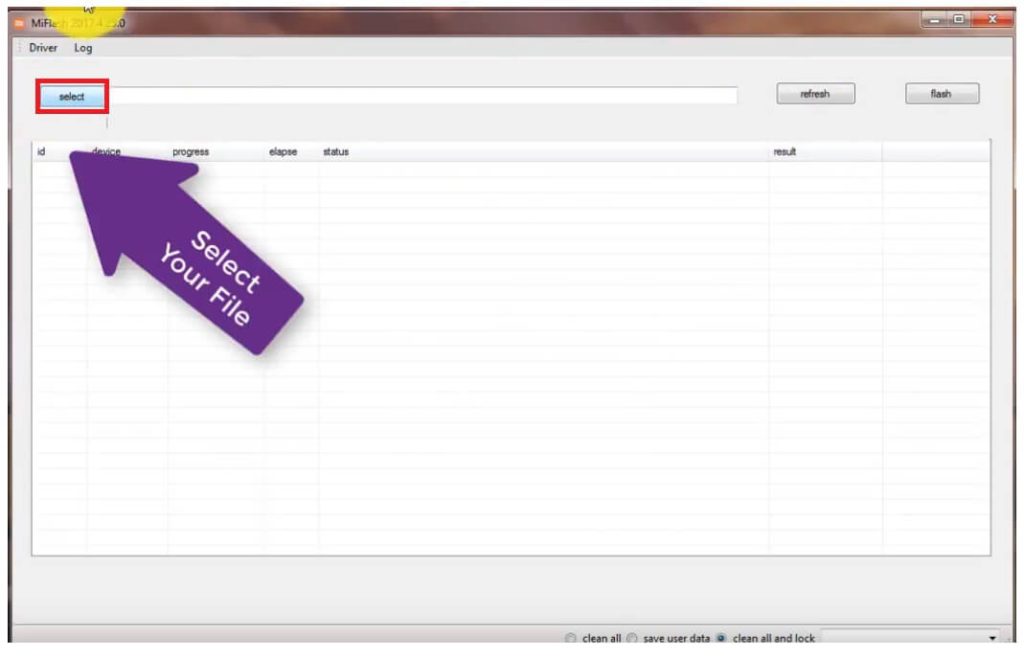
Easy to use UI: The tool comes with an user friendly interface for both 64-bit and 32-bit Windows OS.
Flash Firmware: The Flash Tool allows users to flash or install stock firmware on any Xiaomi Poco, MI, and Redmi Android devices easily.
Simple Procedure: The procedure is quite simple, all you have to do is run the to your computer then Power off and connect your phone to the PC in BROM Mode then select the Disable Auth option on the tool, that’s it.
More: Vivo Flash Tool Latest Version – Flash any Vivo Qualcomm and MTK Phones
Download Xiaomi Mi Flash Tool Latest Version Setup
Xiaomi Flash Tool is a simple & trusted Windows software crafted by Xiaomi.inc especially developed for flash stock firmware on Xiaomi Redmi, Poco, and Mi devices. Here, Download MI Flash Tool latest version along with all version for your Windows computer.
Full Name: Xiaomi_tool
Setup File Name: MI_download_tool.exe
First of all, download and install the Qualcomm USB Driver on your PC First.
| Flash Tool Version | Link |
|---|---|
| Mi_Flash_Tool v20220507 (Latest) | Download |
| Mi_Flash_Tool 2023.4.14.0 (No Auth) | Download |
| Xiaomi_Flash_Tool v4.5.9 | Download |
| Xiaomi_Flash_Tool v5.6.1 | Download |
| Xiaomi_Flash_Tool v5.7.31 | Download |
| Xiaomi_Flash_Tool vv5.10.28 | Download |
| Xiaomi_Flash_Tool v6.4.1 | Download |
| Xiaomi_Flash_Tool v6.8.30 | Download |
| Xiaomi_Flash_Tool v6.12.22 | Download |
| Xiaomi_Flash_Tool v6.12.25 | Download |
| Xiaomi_Flash_Tool v20180528 | Download |
| Xiaomi_Flash_Tool v20181115 | Download |
| Xiaomi_Flash_Tool v20191030 | Download |
| Xiaomi_Flash_Tool v20191111 | Download |
| Xiaomi_Flash_Tool v20191206 | Download |
| Mi_Flash_Tool v20200314 | Download |
| Mi_Flash_Tool v20210226 | Download |
| Mi_Flash_Tool v20210813 | Download |
| Mi_Flash_Tool v20220218 | Download |
Supported Xiaomi Devices:
Xiaomi Redmi K30, Xiaomi Redmi K30 5G, Xiaomi Redmi Note 8T, Xiaomi Mi Note 10, Xiaomi Mi CC9 Pro, Xiaomi Redmi 8, Xiaomi Redmi 8A, Xiaomi Mi 9 Pro 5G, Xiaomi Redmi K20 Pro Premium, Xiaomi Redmi Note 8, Xiaomi Redmi Note 8 Pro, Xiaomi Mi A3, Xiaomi Mi CC9, Xiaomi Mi 9 Lite, Xiaomi Mi CC9e, Xiaomi Mi CC9 Meitu Edition, Xiaomi Redmi K20 Pro, Xiaomi Mi 9T Pro, Xiaomi Redmi Xiaomi K20, Xiaomi Mi 9T, Redmi 7A, Xiaomi Redmi Y3, Xiaomi Redmi 7, Xiaomi Redmi Note 7 Pro, Xiaomi Mi MIX 3 5G, Xiaomi Mi 9 Explore, Xiaomi Mi 9 SE, Xiaomi Mi 9, Xiaomi Redmi Go, Xiaomi Redmi Note 7, Xiaomi Mi Play, Xiaomi Mi Mix 3, Xiaomi Black Shark Helo, Xiaomi Redmi Note 6 Pro, Xiaomi Mi 8 Pro, Xiaomi Mi 8 Lite, Xiaomi Pocophone F1, Xiaomi Mi A2 (Mi 6X), Xiaomi Mi A2 Lite (Redmi 6 Pro), Xiaomi Mi Max 3, Xiaomi Mi Pad 4, Xiaomi Redmi 6 Pro, Xiaomi Redmi 6, Xiaomi Redmi 6A, Xiaomi Mi 8 Explorer, Xiaomi Mi 8, Xiaomi Mi 8 SE, Xiaomi Redmi S2 (Redmi Y2), Xiaomi Mi Mix 2S, Xiaomi Redmi Note 5 AI Dual, Xiaomi Redmi Note 5 Pro, Xiaomi Black Shark, Xiaomi Redmi Note 5 (Redmi 5 Plus), Xiaomi Redmi 5, Xiaomi Redmi 5A, Xiaomi Redmi Y1 (Note 5A), Xiaomi Redmi Y1 Lite, Xiaomi Mi Note 3, Xiaomi Mi Mix 2, Xiaomi Mi A1, Xiaomi Mi Max 2, Xiaomi Redmi 4 (4X), Xiaomi Mi 6, Xiaomi Mi Pad 3, Xiaomi Mi 5c, Xiaomi Redmi Note 4X, Xiaomi Redmi Note 4, Xiaomi Redmi 4A, Xiaomi Redmi 4, Xiaomi Redmi 4 Prime, Xiaomi Mi 6 Plus, Xiaomi Mi Mix, Xiaomi Mi Note 2, Xiaomi Mi 5s Plus, Xiaomi Mi 5s, Xiaomi Redmi Pro, Xiaomi Redmi 3x, Xiaomi Redmi 3s Prime.
How to Use
- Download & extract Mi Flash tool to your Computer
- Open the extracted folder
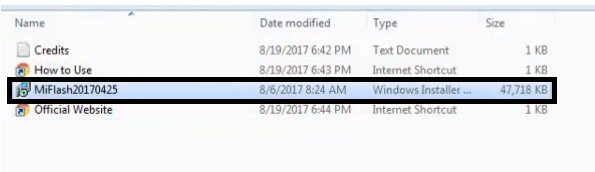
- Run the XiaomiFlash.exe
- Now follow the below instructions to install it
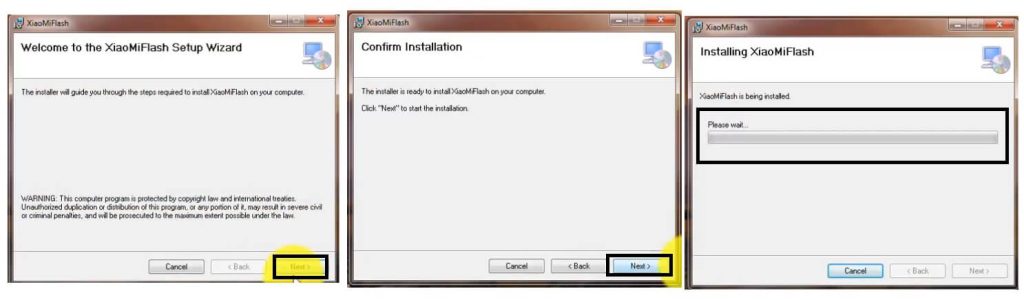
- Tap Next => Next =>
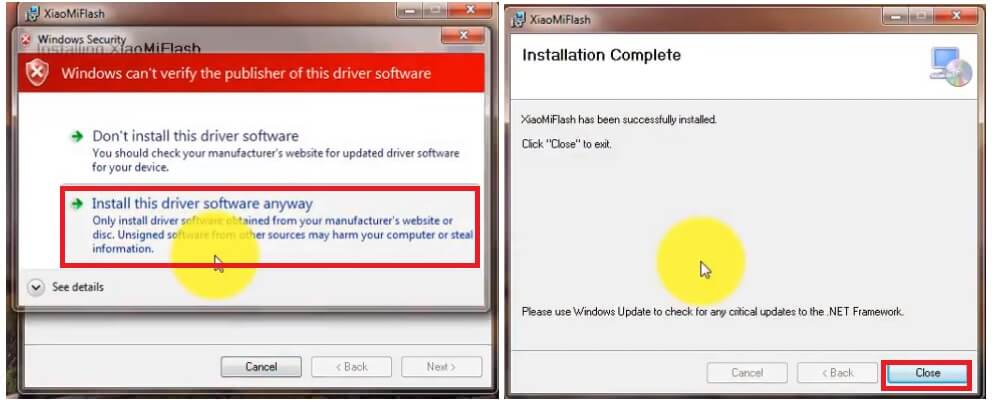
- The installation process will begin
- Let it finish
- Then Click Close
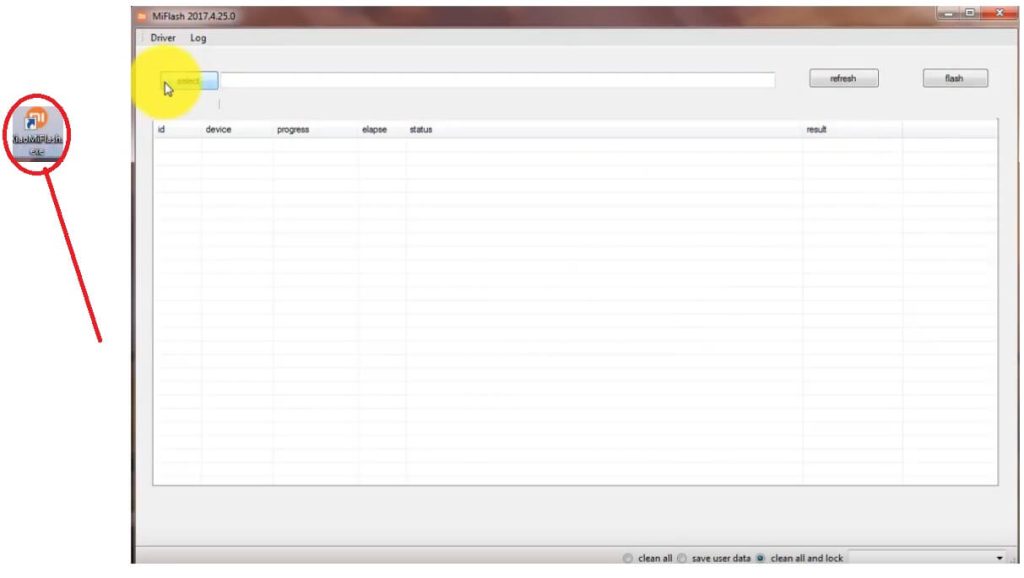
- Now go to the Desktop Screen
- Run XiaomiFlash.exe as Admin
- Now the tool will open
- Download and extract the firmware flash file on your PC
- Go back to Flash Tool
- Tap on Select
- Now Select the Firmware => Images folder
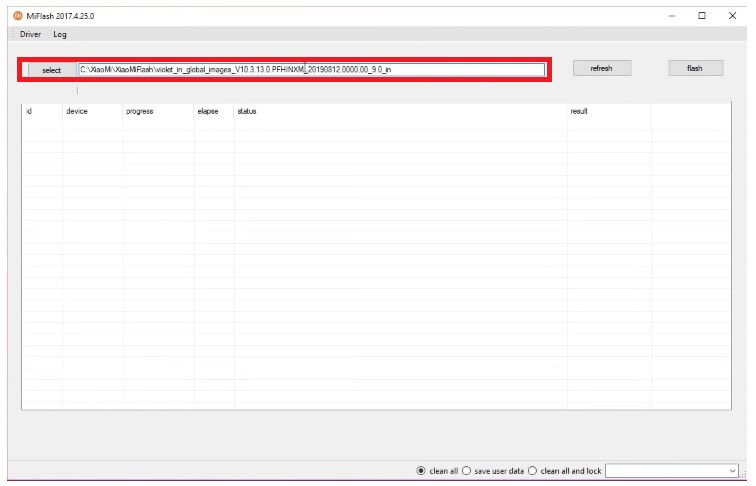
- Then Power Off your Xiaomi phone
- Put it into the EDL Mode & Connect it to the PC
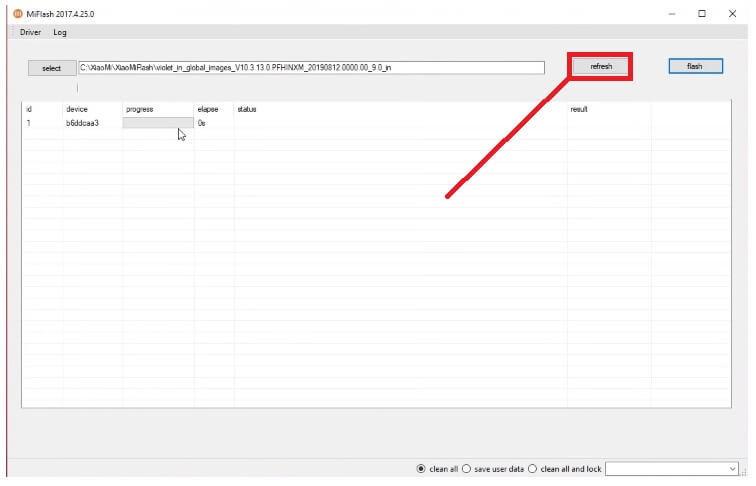
- Click on Refresh
- The device will detect on your PC
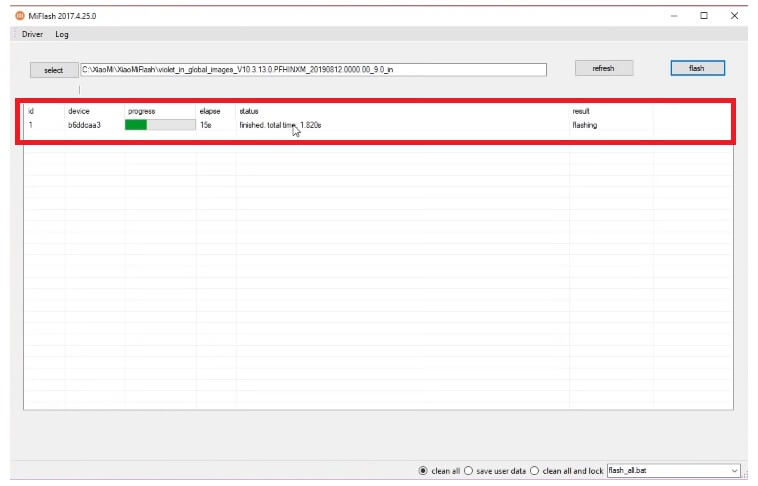
- Click on Flash
- Now the flashing procedure will start
- Wait for the finish.
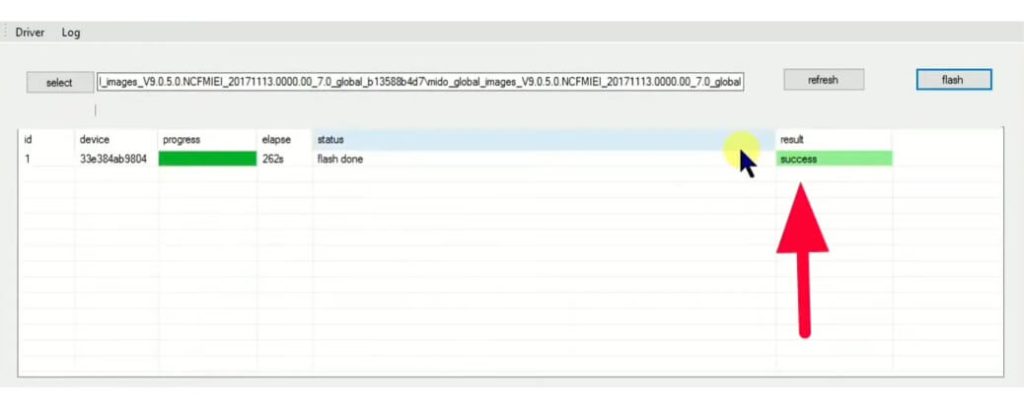
- Once you get the Success message, disconnect and power On your phone.
- That’s it.
Read Me Once:
[*] Caution: This method is for device owner and only for educational purposes, meaning trying this method on a stolen device is a serious crime, it may lead you to the jailed.
Warning: Bypass FRP Files not responsible for any damage on your device please try this at your own risk.
[*] Compatible: The tool works perfectly on the Windows 11, Windows 10, Windows 8, Windows 7 and XP (x32 & x64-bit) architecture.
[*] USB Driver: The USB driver plays a vital role for flashing or unlocking a Xiaomi phone using the flash tool. i.e: Mi USB Driver, Qualcomm USB Driver, MTK USB Driver, SPD USB Driver.
Read More: MSM Download Tool Download (All Version) Latest Setup
