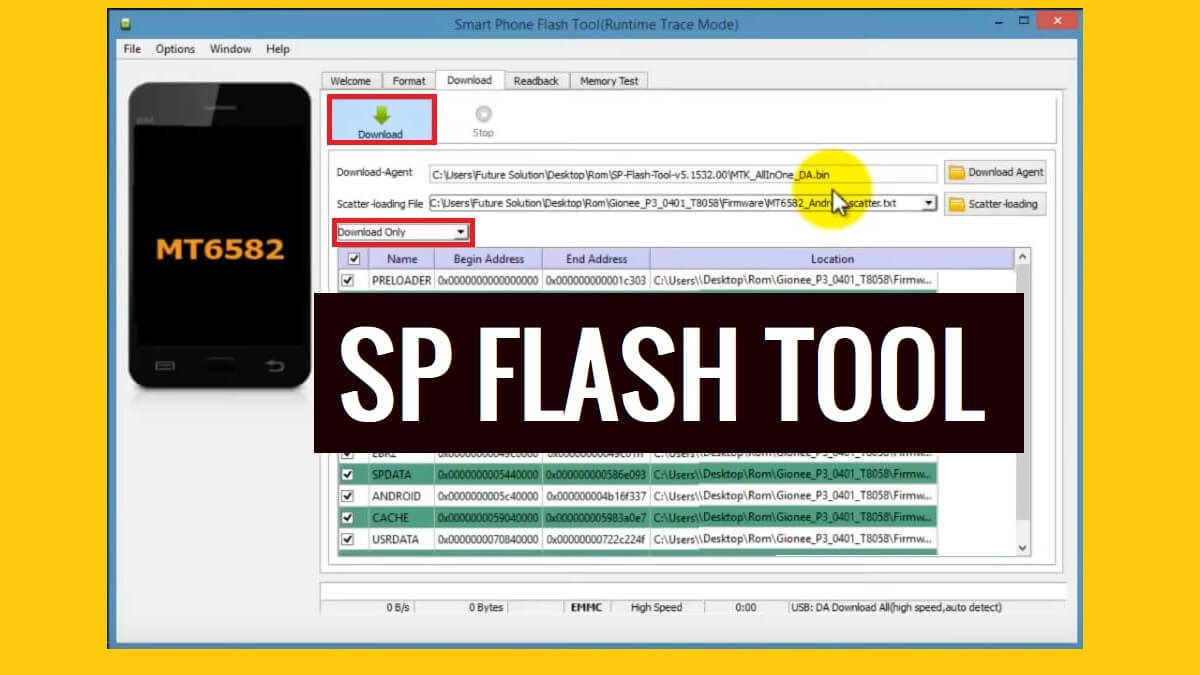
SP Flash Tool is a simple & reliable Windows program that helps users to flash firmware files, and install stock ROM (Scatter-based) Rom on all MTK MediaTek-powered phones & tablets. However, It’s a free & open-source program also known as SmartPhone Flash Tool developed by MediaTek.inc.
The MTK Flash Tool commonly used to fix boot loops, downgrade, remove screen lock, repair stuck-on device logo, format partition, etc on any MTK phone.
In this article, we share with you a detailed guide about How to use The MTK SP Flash Tool V6, V5, V3 latest version setup to flash scatter firmware onto MediaTek devices and fix the phone within a few minutes easily.
More: Download DTPro MTK Service Tool – MTK FRP Userlock Remove Tool Latest Free Version
Download SP Flash Tool V5, V6 Latest Setup All Version
Below, we provide links to download SmartPhone Flash Tool for all Windows & Linux versions, So, click on the version you want to download to your computer.
Download SP Tool V5 for Windows
SP Tool v5 let you install scatter.txt-based stock flash ROM on MTK MediaTek-powered phones and It also allows you to remove screen lock, frp lock, userlock, etc, easily. We always recommend you to use the latest version of the Tool.
| File Name | Download |
| SP_Flash_Tool_v5.2216 [V5 Latest] | Download |
| SP_Flash_Tool_v5.2208 | Download |
| SP_Flash_Tool_v5.2152 | Download |
| SP_Flash_Tool_v5.2148 | Download |
| SP_Flash_Tool_v5.2136 | Download |
| SP_Flash_Tool_v5.2124 | Download |
| SP_Flash_Tool_v5.2120 | Download |
| SP_Flash_Tool_v5.2116 | Download |
| SP_Flash_Tool_v5.2112 | Download |
| SP_Flash_Tool_v5.2104 | Download |
| SP_Flash_Tool_v5.2052 | Download |
| SP_Flash_Tool_v5.2048 | Download |
| SP_Flash_Tool_v5.2044 | Download |
| SP_Flash_Tool_v5.2036 | Download |
| SP_Flash_Tool_v5.2032 | Download |
| SP_Flash_Tool_v5.2028 | Download |
| SP_Flash_Tool_v5.2020 | Download |
| SP_Flash_Tool_v5.2016 | Download |
| SP_Flash_Tool_v5.1952 | Download |
| SP_Flash_Tool_v5.1944 | Download |
| SP_Flash_Tool_v5.1936 | Download |
| SP_Flash_Tool_v5.1924 | Download |
| SP_Flash_Tool_v5.1920 | Download |
| SP Flash Tool v5.1916 | Download |
| SP_Flash_Tool v5.1924 | Download |
| SP_Flash_Tool V3.1216 | Download |
| SP_Flash_Tool V3.1220 | Download |
| SP_Flash_Tool V3.1222 | Download |
| SP_Flash_Tool V3.1238 | Download |
| SP_Flash_Tool V3.1248 | Download |
| SP_Flash_Tool V3.1304 | Download |
| SP_Flash_Tool V3.1304 | Download |
| SP_Flash_Tool V3.1312 | Download |
| SP_Flash_Tool V3.1316 | Download |
| SP_Flash_Tool V3.1328 | Download |
| SP_Flash_Tool V3.1332 | Download |
| SP_Flash_Tool V3.1344 | Download |
| SP_Flash_Tool V5.1343 | Download |
| SP_Flash_Tool V5.1352 | Download |
| SP_Flash_Tool V5.1424 | Download |
| SP_Flash_Tool V5.1436 | Download |
| SP_Flash_Tool V5.1452 | Download |
| SP_Flash_Tool V5.1504 | Download |
| SP_Flash_Tool V5.1512 | Download |
| SP_Flash_Tool V5.1516 | Download |
| SP_Flash_Tool V5.1520 | Download |
| SP_Flash_Tool V5.1524 | Download |
| SP_Flash_Tool V5.1528 | Download |
| SP_Flash_Tool V5.1548 | Download |
| SP_Flash_Tool V5.1552 | Download |
| SP_Flash_Tool V5.1604 | Download |
| SP_Flash_Tool V5.1612 | Download |
| SP_Flash_Tool V5.1616 | Download |
| SP_Flash_Tool V5.1620 | Download |
| SP_Flash_Tool V5.1624 | Download |
| SP_Flash_Tool V5.1628 | Download |
| SP_Flash_Tool V5.1632 | Download |
| SP_Flash_Tool V5.1636 | Download |
| SP_Flash_Tool V5.1640 | Download |
| SP_Flash_Tool V5.1644 | Download |
| SP_Flash_Tool V5.1648 | Download |
| SP_Flash_Tool V5.1716 | Download |
| SP_Flash_Tool V5.1720 | Download |
| SP_Flash_Tool V5.1724 | Download |
| SP_Flash_Tool V5.1728 | Download |
| SP_Flash_Tool V5.1736 | Download |
| SP_Flash_Tool V5.1744 | Download |
| SP_Flash_Tool V5.1752 | Download |
| SP_Flash_Tool V5.1804 | Download |
| SP_Flash_Tool V5.1812 | Download |
| SP_Flash_Tool_v5.1816 | Download |
| SP_Flash_Tool_v5.1820 | Download |
| SP_Flash_Tool_v5.1836 | Download |
| SP_Flash_Tool_v5.1844 | Download |
| SP_Flash_Tool V5.1824 | Download |
| SP_Flash_Tool_v5.1904 | Download |
| SP_Flash_Tool V5.1916 | Download |
| SP_Flash_Tool_v5.1912 | Download |
Pros
=> Support every single Android Phone.
=> Various options available.
=> Frequent updates.
=> Free Tool
Cons
=> Its for Advance users
=> Need Activations
=> Cost Pretty HighMust install: MTK USB Driver Free Download Latest All Version for Windows (2022)
Download SP Tool V6 for Windows
SP Tool v6 enables users to install xml-based stock flash file ROM on any MediaTek-powered Smartphones and Tablets and It also let you remove screen lock, frp lock, userlock, etc, easily. We always recommend you to use the latest version of the Tool.
| SP_Flash_Tool_v6.2216 [V6 Latest] | Download |
| SP_Flash_Tool_v6.2208 | Download |
| SP_Flash_Tool_v6.2152 | Download |
| SP_Flash_Tool_v6.2148 | Download |
| SP_Flash_Tool_v6.2136 | Download |
| SP Flash Tool v6.2124 | Download || Mirror |
| SP_Flash_Tool_v6.2120 | Download |
Download SP Flash Tool for Linux
| File Name | Links |
| SP_Flash_Tool_v6.2208 (Latest) | Download |
| SP_Flash_Tool_v5.2208 (Latest) | Download |
| SP_Flash_Tool_v6.2152 | Download |
| SP_Flash_Tool_v5.2152 | Download |
| SP_Flash_Tool_v6.2148 | Download |
| SP_Flash_Tool_v5.2148 | Download |
| SP_Flash_Tool_v6.2136 | Download |
| SP_Flash_Tool_v5.2136 | Download |
| SP_Flash_Tool_v6.2124 | Download |
| SP_Flash_Tool_v5.2124 | Download |
| SP_Flash_Tool_v6.2120 | Download |
| SP_Flash_Tool_v5.2120 | Download |
| SP_Flash_Tool_v5.2112 | Download |
| SP_Flash_Tool_v5.2104 | Download |
| SP_Flash_Tool_v5.2052 | Download |
| SP_Flash_Tool_v5.2044 | Download |
| SP_Flash_Tool_v5.2036 | Download |
| SP_Flash_Tool_v5.2032 | Download |
| SP_Flash_Tool_v5.2028 | Download |
| SP_Flash_Tool_v5.2020 | Download |
| SP_Flash_Tool_v5.2016 | Download |
| SP_Flash_Tool_v5.1952 | Download |
| SP_Flash_Tool_v5.1944 | Download |
| SP_flash_tool_V5.1916 | Download |
| SP_flash_tool_V5.1904 | Download |
| SP_flash_tool_V5.1836 | Download |
| SP_Flash_Tool_v5.1828 | Download |
| SP_flash_tool_V5.1824 | Download |
| SP_Flash_Tool_v5.1816 | Download |
| SP_flash_tool_V5.1812 | Download |
| SP_Flash_Tool_v5.1804 | Download |
| SP_flash_tool_V5.1752 | Download |
| SP_flash_tool_V5.1728 | Download |
| SP_flash_tool_V5.1716 | Download |
| SP_flash_tool_V5.1708 | Download |
| SP_flash_tool_V5.1844 | Download |
| SP_flash_tool_V5.1828 | Download |
| SP_flash_tool_V5.1816 | Download |
| SP_flash_tool_V5.1804 | Download |
| SP_flash_tool_V5.1744 | Download |
| SP_Flash_Tool_v5.1728 | Download |
| SP_flash_tool_V5.1724 | Download |
| SP_flash_tool_V5.1712 | Download |
| SP_flash_tool_V5.1648 | Download |
| SP_Flash_Tool_v5.1520 | Download |
| SP_Flash_Tool_v5.1512 | Download |
| SP_Flash_Tool_v5.1504 | Download |
What does SP Flash Tool Do?
Nowadays, Most Android users facing problems like Stuck at bootlogo, DRL errors, Slowness, forgotten Pattern Password, and FRP lock with Android smartphones. This happens due to negligence and trying to customize the phones by rooting or flashing custom files & recoveries.
The Factory Reset can fix it temporarily but this is not a permanent solution for this. So, flashing is the only solution to fix the issues permanently.
The procedure of using the SP Flash tool with the flash file is pretty simple, just run the tool on your PC, then select the stock firmware, Then Click on the Start button, Now Power Off your phone and Put it into the download mode then connect to the computer, that’s it.
Features
Unbrick MTK Android Phones: It allows users to unbrick the smartphones by flashing the particular official firmware flash file.
Unlock Phones: Users can use the tool to unlock any MTK-Powered Smartphone by simply flashing the stock firmware rom or format the selected partitions.
Support Multi-Language: It supports multi numbers of languages. With this feature, anybody can use this tool very conveniently.
Simple User Interface: It comes with a simple UI (User Interface), you no need be an expert in-order to use the program on the PC.
Multiple Options: The tool has multiple options such as Format, Download, Readback, Memory Test, Bandwidth Selection, etc that surely enhances the credibility of the tool.
Flash Scatter File Firmware: It supports to flash Scatter.txt extension firmware file on Smart and feature phones.
FRP Unlock: It also helps users to unlock FRP lock from MediaTek phones by format the FRP parttion of the device. FRP bypassing is Google Gmail verification process required after format or factory reset the phone.
How to use MTK Flash Tool V5
- Download SP Flash Tool to your computer.
- Then extract the tool with WinRaR or 7zip
- Now Open the Flash tool folder

- Run SP_Flash_tool.exe

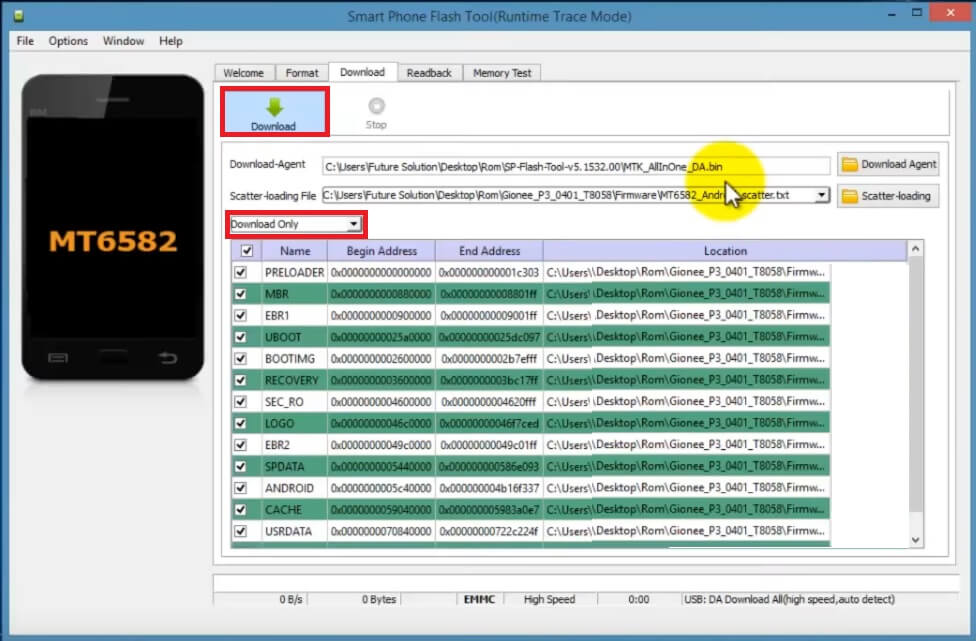
- Click on Choose from Download-Agent file Tab and select the MTK_All_IN_ONE_DA.bin file from the SP Tool folder.
- Tap Open

- Download the stock firmware file for your phone
- Click on Choose from Scatter-Loading File Tab and select the MTXX_Android_scatter.txt file from the Flash file folder.
- Tap Open
- Now Click on Download
- It has 3 options to flash the firmware, Download Only, Format All, Format + Download.
- Always use the Download Only
- Download Only: Flash all the system files except Boot, FRP & NV Data.
- Format All: It will erase the whole system data, you will face IMEI, and SN errors & the device will be dead.
- Format + Download: It will erase the whole system data & Flash the firmware you selected on the tool. (Also, it will delete the NVdata and you will face IMEI, SN error).
- Always use the Download Only
- Power Off your MTK Android phone.
- Connect your device to computer via USB cable

- Open Device Manager => Check the COMPORT Number
- Select the COMPORT number (In my case I have COM9)
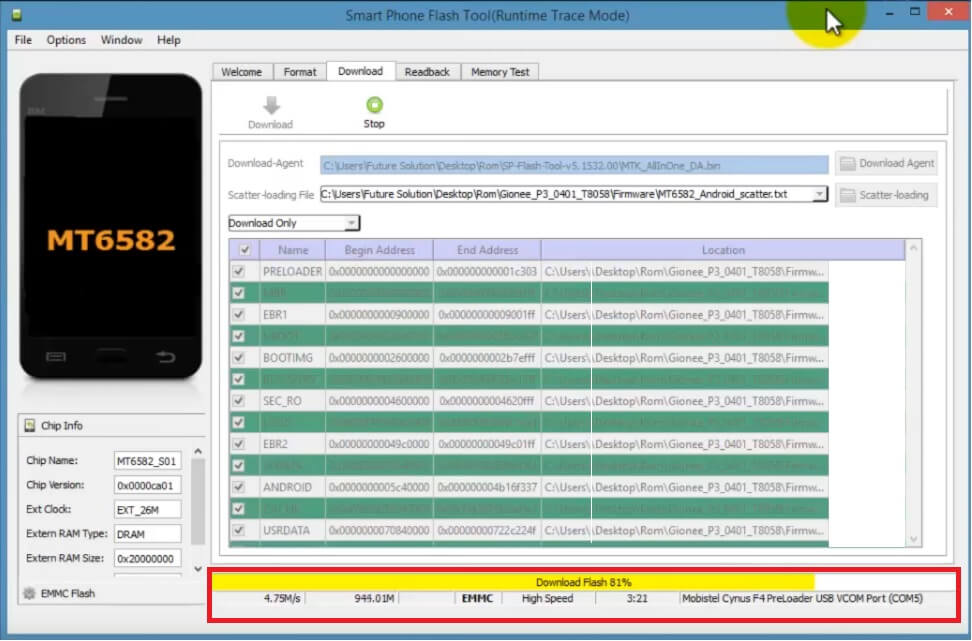
- The Flashing process will begin
- It will take some time to finish
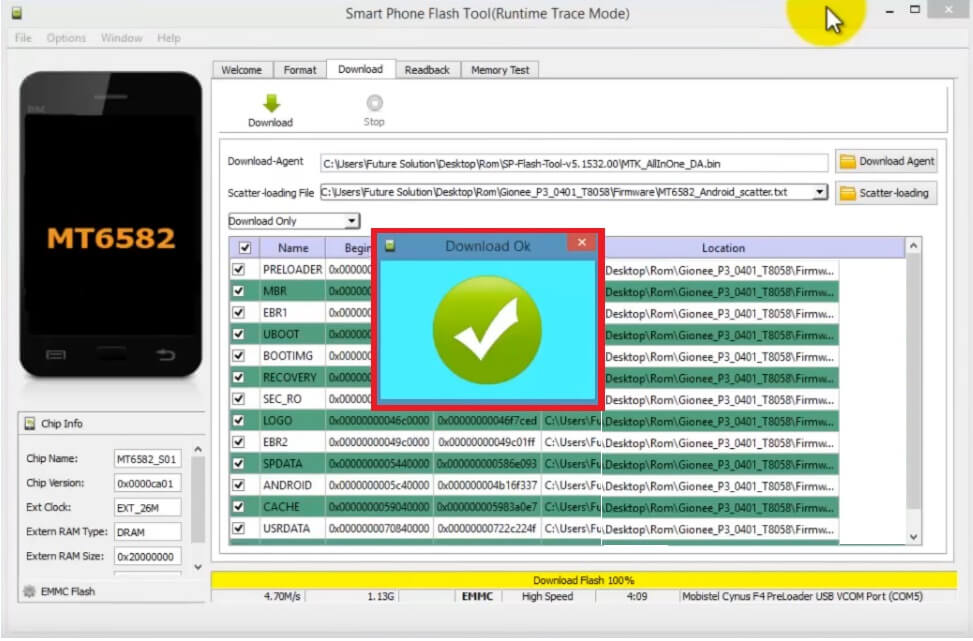
- Once finished, disconnect and Power On your phone
- Setup all initial steps.
- That’s it.
Please Note: Flashing doesn’t help you Unlock the FRP lock, you have to use the Format Options to unlock the FRP from your phone. So, If you only want to unlock the FRP then you don’t need to flash the whole firmware, just download the MTK FRP Scatter file & follow the below steps. Also, you can use the below steps to unlock the screen lock without flashing the phone.
How to Use SP Tool V6
- Download & extract SP Flash Tool V6 to your computer.
- Now Open the Flash tool folder
- Run the SpFlash V6.exe to your PC
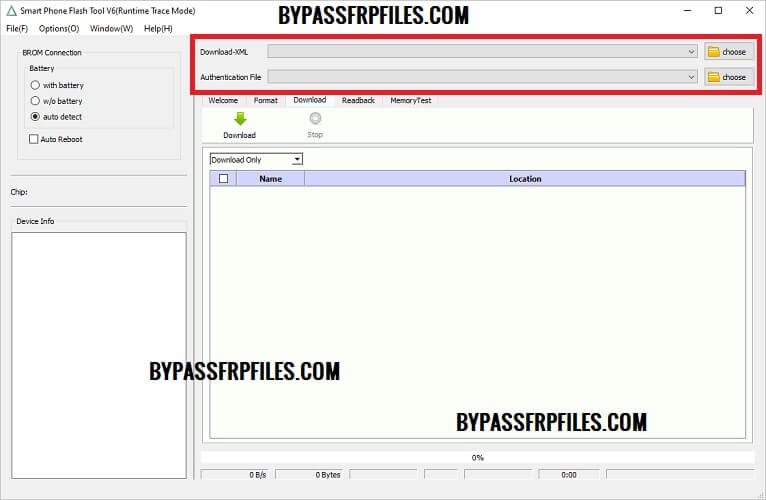
- The following window will Open
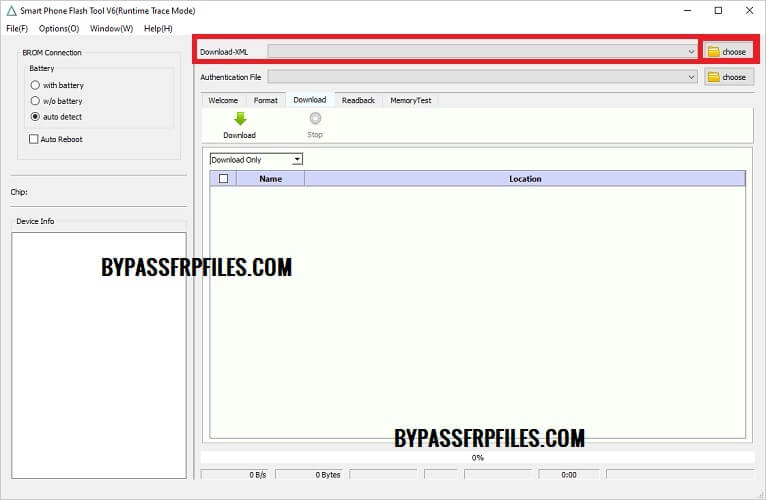
- Now download & extract the XML Firmware to your PC
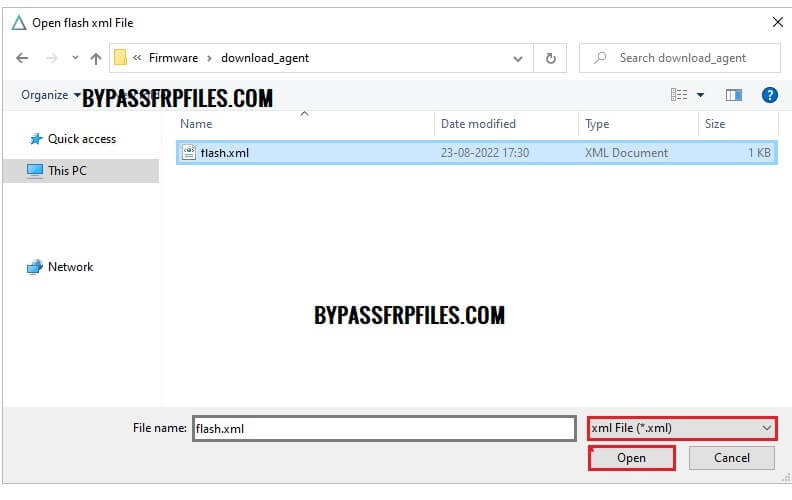
- Click on Choose from Download-XML Tab and select the XML Firmware from the stock Firmware folder of your MTK phone.
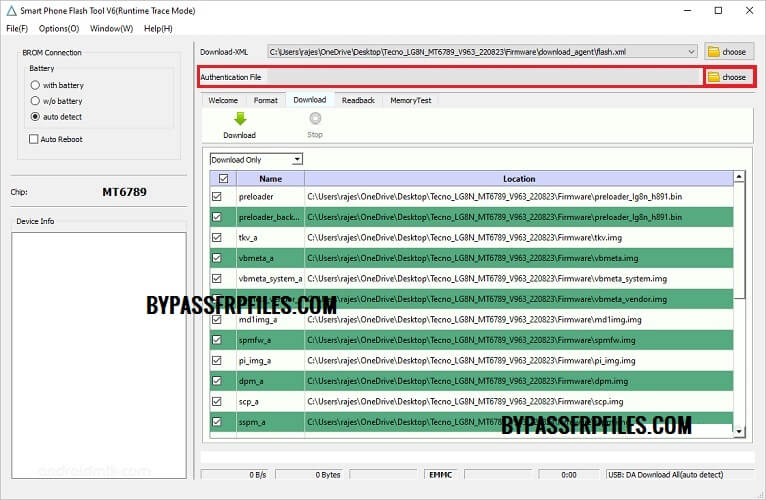
- Now load the Authentication File
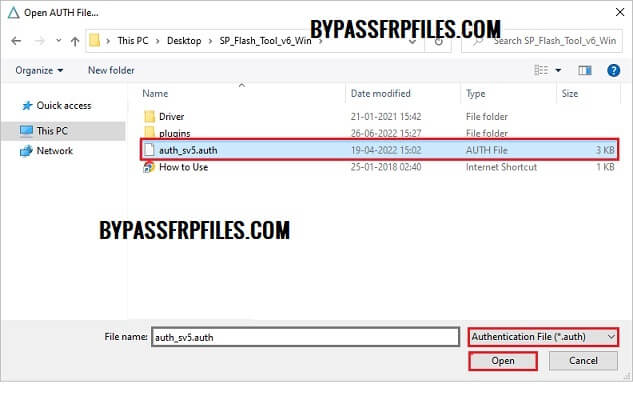
- Click on Choose from Authentication File tab & select the Auth File from the SP Tool V6 folder
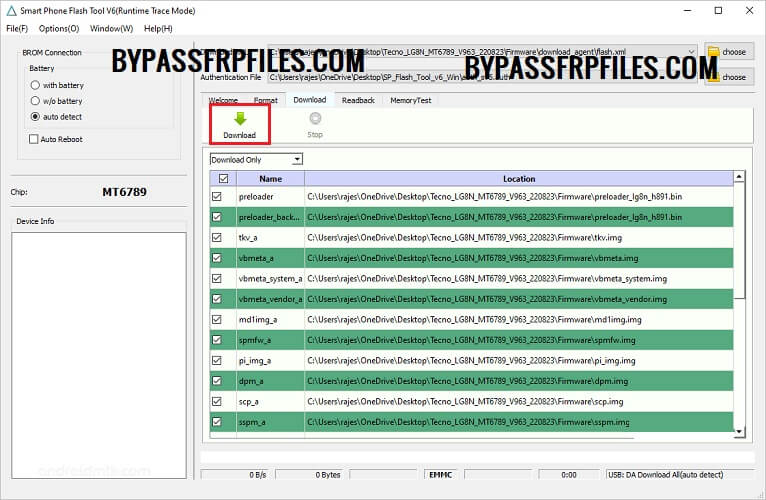
- Then Click on Download
- Now Power off your MTK MediaTek phone
- Connect your MTK Phone to computer via USB cable by Pressing “Vol – & Vol +”
- The Flashing process will begin
- Wait for some time to finish
- Once finished, Then disconnect and Power On your MTK phone
- Setup all initial steps.
- That’s it.
Read Me
Backup: Make sure, Before you use the tool with your smartphone, don’t forget to take a backup of the device data, flashing will erase all your data.
MTK Driver: We highly recommend installing the MTK USB Driver on your computer before you use the tool.
Virus Scan: We scanned all the files with Malwarebytes before uploading the file & published it here.
Read More: MSM Download Tool Latest 2023 (All Version) Free Setup Download

