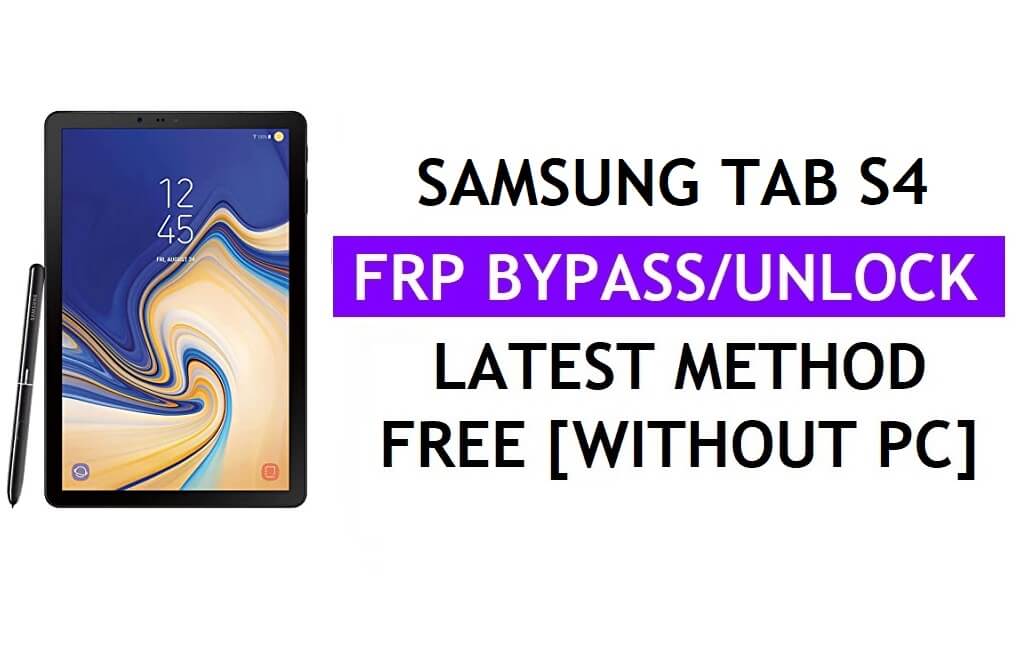
This page, we will show you How to Bypass Google FRP verification lock on Samsung Tab S4 all Android 10, 8.1, and 9.0, latest security patch version. So, follow this step-by-step guide to Unlock Google FRP and regain access to your phone.
Read: Bypass Google Verification FRP on Samsung Galaxy A03s
Why do you need to Bypass FRP lock?
The FRP (Factory Reset Protection) lock on Android is a feature to protect phone from unauthorized access.
Read: Bypass FRP Samsung Tab A 10.5
In case, If you forget the Pattern, Password and fingerprint lock and you or someone tries to hard reset the phone, then the phone will ask you to enter the previously synced Gmail ID to access your device home screen once again.

Then why we need to Bypass Google lock? the answer is pretty simple, if you forget the last synced Gmail ID, you need to Bypass FRP lock to reuse the phone again. Let’s start the procedure.
Read: Bypass Google FRP Samsung Tab S4
How To Disable FRP from Settings
If you want to disable the FRP lock feature from your Samsung Tab S4 then you need to delete the Gmail Account from the device Settings. follow the below process completely to disable the Factory Reset Protection successfully: go to the settings menu > Accounts> select the Gmail id > remove account > that’s it.
The FRP Unlock process has become very challenging, Also you can use any compatible FRP bypass tool & FRP Bypass APK according to your phone to unlock FRP, and here I share the latest FRP Bypass process to bypass FRP lock from your device.
More: ACT SAM-FRP Tool V1 Download Latest Version Remove FRP Free
How to Samsung Tab S4 FRP Google Bypass
We all know now its very annoying to facing frp lock issue on our devices, we always working to find a new method to Bypass Google FRP Samsung Tab S4 easily. Let’s Start the process.
Make Sure:- This process only for the device owner. Bypass FRP Files not responsible for any damage on your device please try this at your own risk.
Read: Bypass Google Verification on Samsung Galaxy M53 5G
Method 1: Android 10 FRP Bypass
- First, Switch on your Samsung Tab S4
- Click on Start button
- Agree to Terms & Conditions and click Next

- Connect your Samsung Tab S4 to a Wifi network
- Download & extract the Samsung FRP Tool V1.6to your computer
- Samsung FRP Bypass Tool V1.6
- Mirror Link: Samsung FRP Tool
- Open the unzipped folder
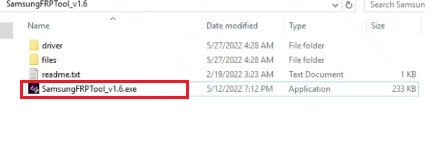
Run Samsung FRP

- Run the SamsungFRPTool_v1.6.exe as administrator

- On the FRP Tool, Click Disable Driver signature enforcement.
- Then Restart your PC
Connect the Samsung phone to Windows
- Now Connect your Samsung phone to the PC in Normal MTP Mode

- Open Device Manager on your PC,
- Check Samsung Mobile USB Modem & Portable Device will appears
- (If not showing then install Samsung USB driver from FRP folder)
- Now Reopen the FRP tool.
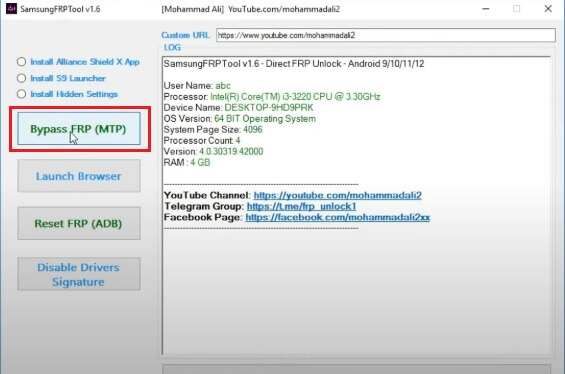
- Click on Bypass FRP (MTP)
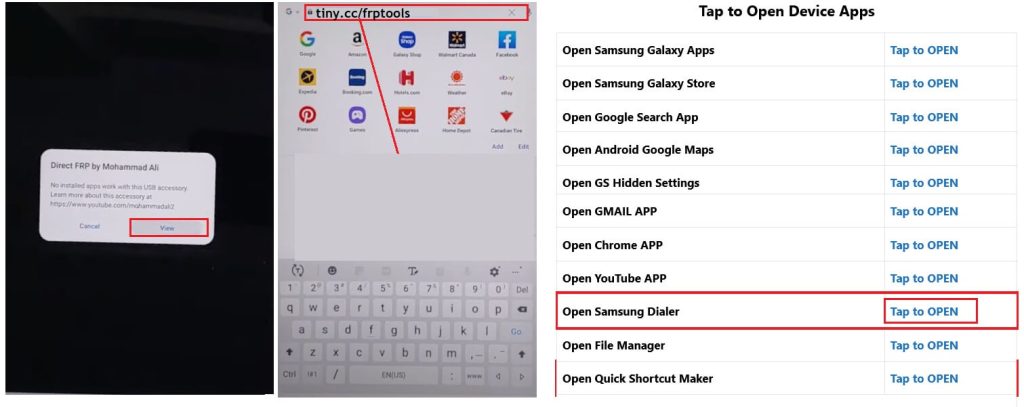
Access to our FRP Page

- Check on your phone, A Direct FRP popup window will appears.
- Tap on View to Open Browser.
- Now it will lead you to the Samsung Internet or Chrome Browser.
- Tap on the Search bar and type any of these two URLs
- Go to the FRP Bypass Apk =>> tap to Open device Apps section
- Select Open Samsung Dialer =>> Tap to Open
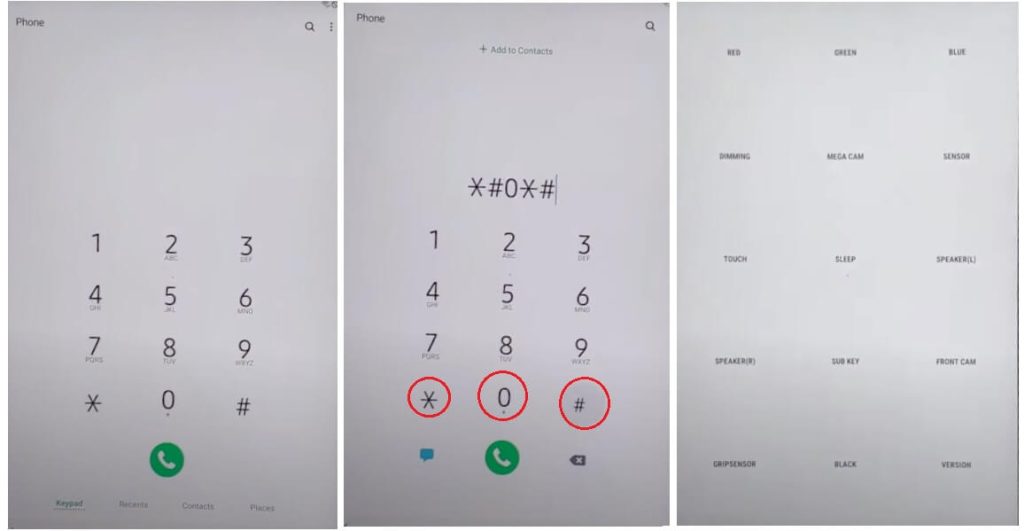
Dial *#0*#

- Now dial *#0*#
- The Test Mode will appear
- Connect your device to the PC
- Go back to the FRP Tool
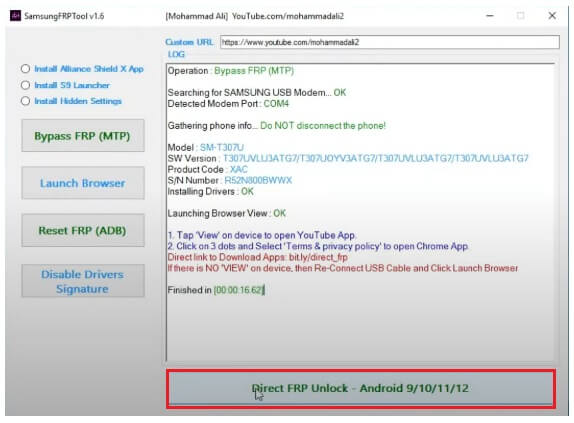
Click on Direct FRP unlock

- Click on Direct FRP Unlock – Android 9/10/11/12
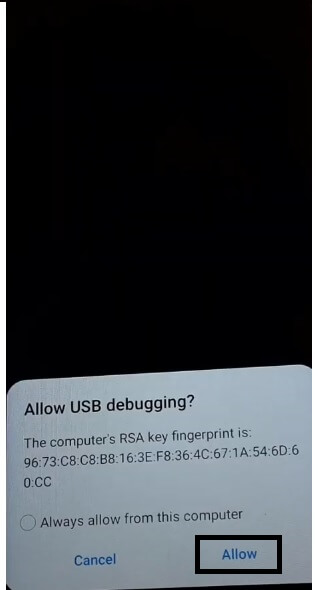
- Check on the phone and Tap Allow
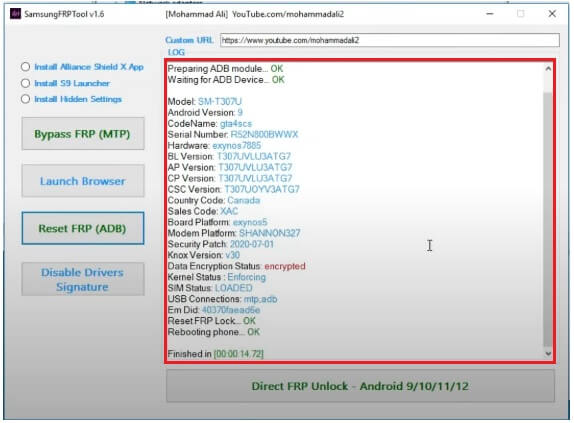
- Now wait for remove FRP lock & reboot the phone
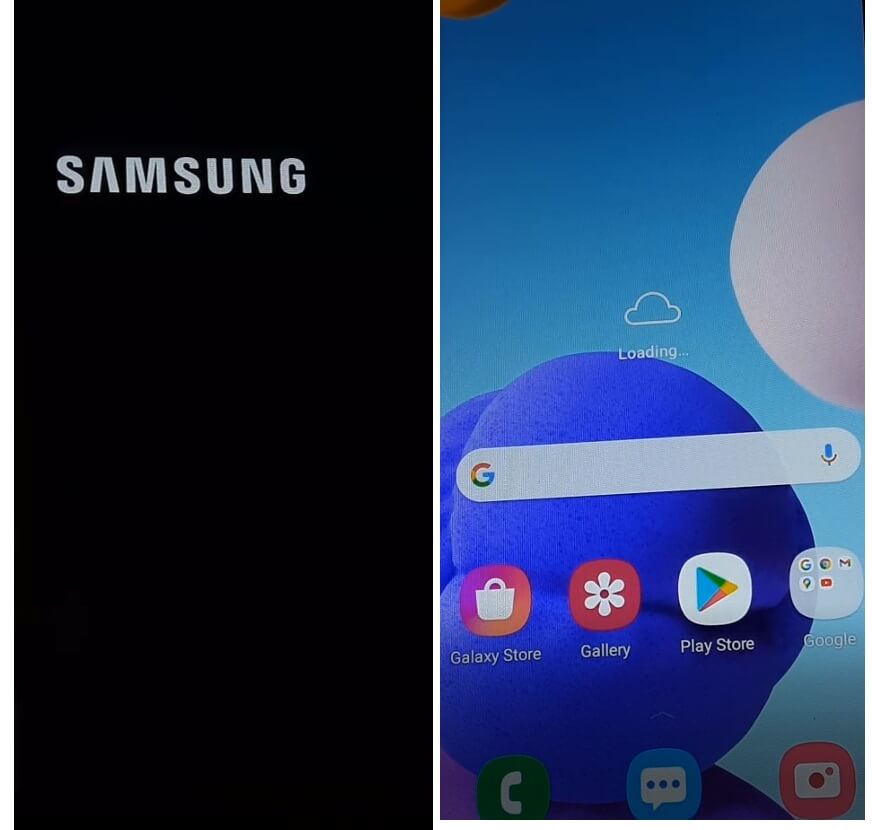
- Once Rebooted, Tap on blank screen once or Select Samsung Setup Wizard.
- That’s it.
- You have successfully bypassed the FRP lock from Samsung Tab S4
- Make sure, Goto settings and Factory Reset the device.
Read: Bypass Google Verification FRP on Samsung Galaxy F04
Method 2: Android 9.0 FRP Unlock
1. First, Switch on your Samsung Tab S4
2. Click on Start button
3. Agree to Terms & Conditions and click Next

4. Connect your Samsung Tab S4 to a Wifi network
5. Download & extract the Samsung FRP Tool V1.4 to your computer
- Samsung FRP Bypass Tool V1.4
- Mirror Link:
- Samsung FRP Tool
6. Open the unzipped folder
Run SamFRP Tool

7. Run the SamsungFRPTool_v1.4.exe as administrator

8. On the FRP Tool, Click Disable Driver signature enforcement.
9. Then Restart your PC
10. Now Connect your Samsung phone to the PC in Normal MTP Mode
Connect the Samsung phone to PC

11. Open Device Manager on your PC,
12. Check Samsung Mobile USB Modem & Portable Device will appears
13. (If not showing then install Samsung USB driver from FRP folder)
14. Now Reopen the FRP tool.
15. Now put a check on Install Alliance Shield X App

16. Click on Bypass FRP (MTP)

17. Check on your phone, A Direct FRP popup window will appears.
Install Alliance Shield X App directly from Galaxy Store
1. Tap on View to install Alliance Shield X App directly from Galaxy Store.
2. Now it will lead you to the Galaxy Store.
3. If Galaxy Store prompts you to update, Then tap Update & follow the above browser access process again.

4. Now Tap Install
5. Sign In prompt will appears, Sign In With your Samsung Account, then tap Cannel

6. Then Confirm Install & Open the Alliance App Shield X App on your FRP phone
7. You have successfully access the Alliance Shield App without Samsung Cloud
8. Tap Next => Next => Next => Got IT
Open Alliance Shield

1. Click on Register and then enter your username, password, email & confirmation code, Tap Submit and check your email for verification link
2. If you have Alliance Shield Account, Tap Sign In
3. Name your Device: Android 11 FRP & tap next

4. Enable Device Admin and then tap Activate (You must see Admin enabled)
5. Tap Next

6. Enable Knox and then tap Confirm (you must see knox license validation successfully)
7. Tap Next =>> Finish
8. Knox and Admin must be in Green to Bypass FRP lock on Samsung Tab S4 Android 10

9. Go to App Manager and Search for Service Mode => Activities

10. Search & Open: com.sec.android.app.modemui.activities.usbsettings

Final Step to Unlock Android 9 Samsung Tab S4 FRP Lock
1. Put an check on MTP + ADB and then connect USB Cable to phone
2. Now Go back to the Samsung FRP Tool V1.4

3. Click on Reset FRP (ADB)

4. Tap Allow on Phone & wait for remove FRP lock & reboot your Samsung Tab S4

5. To Fix the “To Unlock, Sign in with your Google Account “
6. Press the Power Key to lock the phone

7. Then Go to Settings by using Notification bar
8. Select General Management =>> Reset => Factory Data Reset
9. Enter your Samsung Account Password => Tap OK
10. After Reset, FRP lock will remove completely.
11. That’s it.
Read: MediaTek Samsung A02 FRP Bypass
Method 3: Android 8.1 Erase FRP lock
1. First and foremost, Power On your Samsung Tab S4 .
2. Then connect your device to a working wifi network.
3. Once done, then you insert a valid sim card on your device.
Read: Bypass Google Verification on Samsung Galaxy M32 Prime Edition
Use other Android phone
1. On your other Android phone, you have to download “Hutch SMS” apk from- Here
2. Once you download the apk file, install the Apk file on your other android phone.
3. By taping on downloaded apk file then tap on next -> next -> Open,
4. Once you open the apk file then tap on the “Wap Push SL” option from there.
5. Then on the first tab, you have to enter the “Phone Number”, and then select “USE No URL Prefix”.
6. Once you did, then on URL type the following URL there, “www.youtube.com/@bypassfrpfiles” there and send the SMS from there.

7. Wait few seconds, then check your device you get popup SMS on your Tab S4 device.
8. Then hit the “Ok” button from there.
9. Done, Now you will successfully access the “youtube” application from there,
10. Now you need access the web browser for downloading some FRP files.
Read: Bypass Google FRP Samsung A24
Access to chrome Browser
1. Once you access the Youtube app, then drag down the video,
2. After that, tap on the “User Icon” from the top right corner on your device.
3. Then tap on the “Settings” from there,
4. Now tap “About” and then tap on “Google Privacy Policy” from there.
5. Congrats now you will successfully access the “Chrome” browser on your device.

Read: Bypass FRP Samsung A15 5G
Download FRP apps
1. Now on the “Chrome” browser tap on the “Accept & Continue” and then tap “No thanks”.
2. Then on the top bar of your “chrome” browser, you will get a search bar.
3. Visit our FRP Bypass apps page by typing the any of the following URL’s .

4. Now you can access the “Bypass frp” page.
5. Download the following application.
- Google Account Manager (6).apk
- FRP Bypass (GD).apk
6. First, download only one application Google Account Manager (6).apk.
7. Once you downloaded, tap “open”.
8. Then tap the settings and enable the “Allow this Source”.
9. Now go back and install the “Google Account Manager (6)” apk by tapping Install – next – done,
Read: Bypass FRP Samsung A14
Final Steps to Bypass FRP Samsung Tab S4
1. Then download the “FRP Bypass.apk”.
2. Tap Open & Install the apk and open it.
3. After the application is opened, just tap on the “3” dots from the top right corner
4. Then tap on the “Browser Sign-in” option from there.
5. After that, once again a popup box will appear, just tap on “Ok”,
6. Then sign in there with your any valid Gmail id.

7. Once you Sign in with your Gmail id then this applications will automatically be closed.
8. Just Restart your device once again,
9. Then complete all setup,
10. Done, you have successfully Bypass FRP Samsung Tab S4 (Android-8.1.0) without PC easily.


