FRP is an inbuilt data protection feature for all present-day Android smartphones, It protects phones from unauthorized access. After performing a factory reset, If you forget the last active Gmail account which was used on your phone, then, you have to find a solution to unlock your phone. Here, more especially, I share a detailed process to Celkon Millennia Hero FRP Bypass (Android 5.1.1) – Unlock Google Gmail Verification Lock Without PC (New Security Patch) successfully. So, follow the below process carefully.
Google provides the new FRP feature on Android Lollipop, Marshmallow, Nougat, Pie, Oreo, and 10 Q versions. The summarization of factory reset protection is FRP and it basically protects Android users’ personal data and Privacy during thefts. The process of unlocking FRP security has different with every new Android version and phone. So, always remember the Gmail account information to avoid FRP protection lock.
The FRP turns On automatically when you have setup a Google Account on your Celkon Millennia Hero Phone. After Reset your phone without removing the Google Account, you have to log in with the same Google ID and password that you set up earlier on the device to bypass Google account verification lock on your Celkon Millennia Hero.
In case, your device stuck at the FRP lock verification screen and you have forgotten the account information, Then these simple step-by-step instructions will help you to bypass google account lock from your device.
The Celkon Millennia Hero FRP Unlock process has become very challenging, Also you can use any compatible FRP bypass tool & FRP Bypass APK according to your phone to unlock FRP, and here I share the latest FRP Bypass process to bypass FRP lock from your device.
How To Disable Factory Reset Protection
If you want to disable the FRP lock feature from your Celkon Millennia Hero then you need to delete the Gmail Account from the device Settings. follow the below process completely to disable the Factory Reset Protection successfully: go to the settings menu=>> Accounts=>> select the Gmail id =>> remove account =>> that’s it.
Bypass FRP Files not responsible for any damage on your device please try this at your own risk.
More: SP Flash Tool (Smartphone Flash Tool) V6, V5, V3, Latest All Version Free
How to FRP Bypass Celkon Millennia Hero Unlock Google (Android 5.1)
- First, Switch on your Celkon Millennia Hero.
- Tap Let’s Go and connect your phone to a Wi-Fi Network
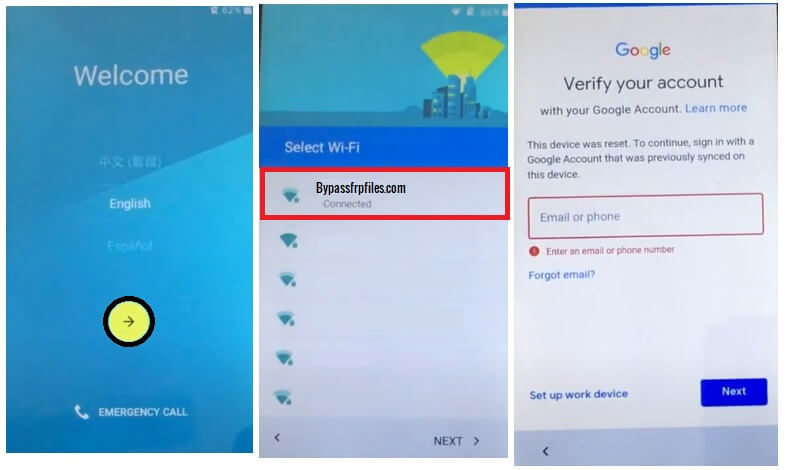
- Go back to Google Account verification screen
- Tap on Email or Phone tab to bring the keyboard
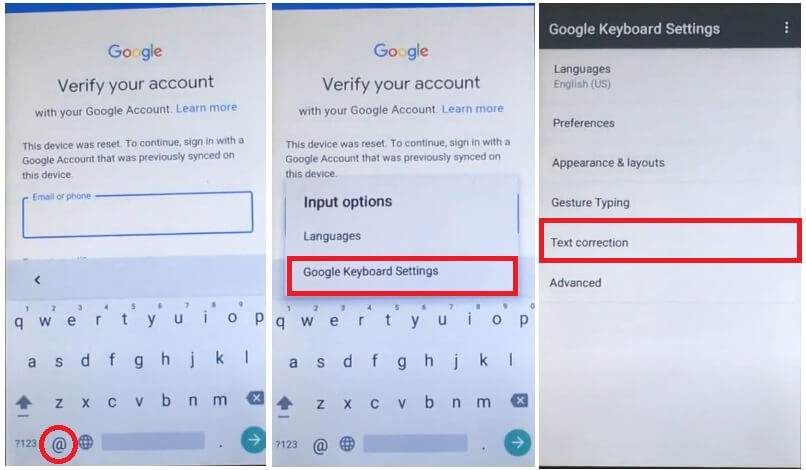
- Tap & hold the @ icon on keyboard
- Select Google Keyboard Settings =>> Text Correction =>>
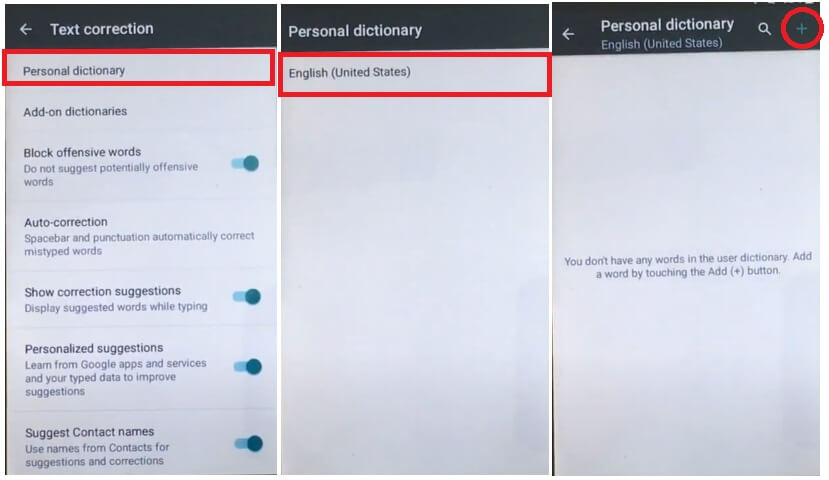
- Tap on Personal Directory => English (United States) =>
- Tap on +(Plus) icon from the top-right corner
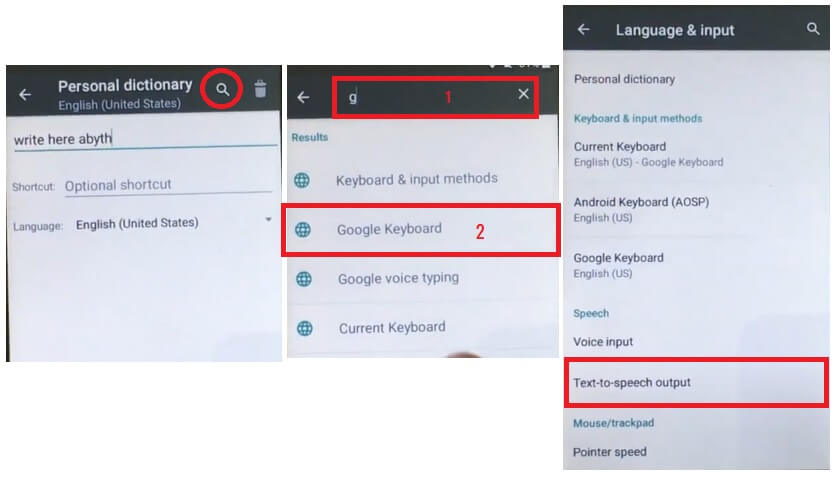
- Click on Search (Magnify) icon
- Now Search for “Google Keyboard” & Select it
- Select Text-to-Speech Output
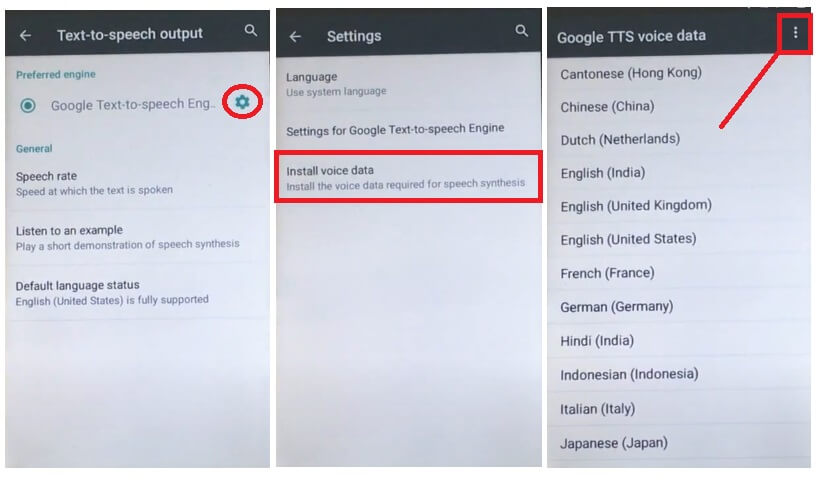
- Tap on the Search (Magnify) icon =>> Install Voice Data
- Tap on 3dots from the top right corner => Open Source License
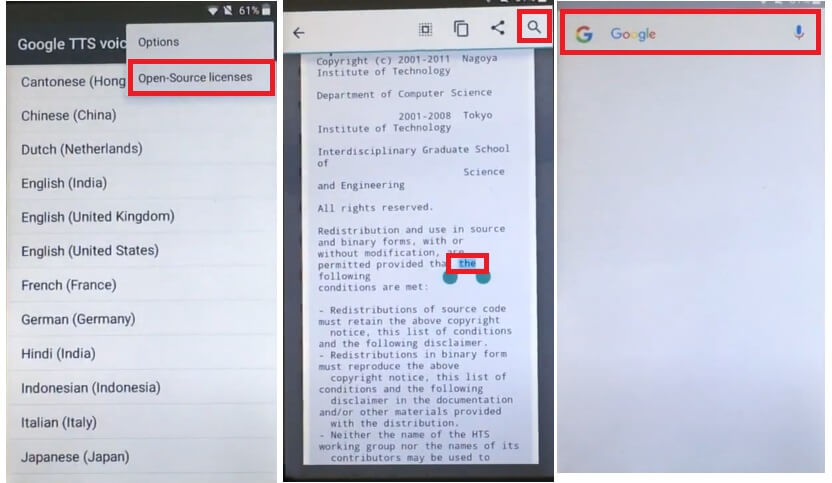
- Now select any words
- Then Tap on the Magnify (Search) icon
- It will lead you to the Google Search
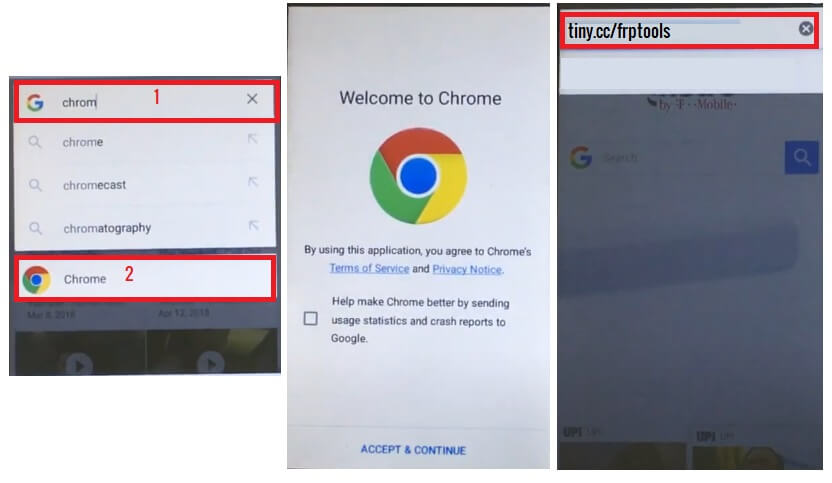
- Now Search Chrome & then Select it
- Now you can access the Chrome Browser
- Search any one of these two below URLs:
- Scroll down on the FRP Bypass APK section
- Download these below-listed application
- FRP_Bypass.apk
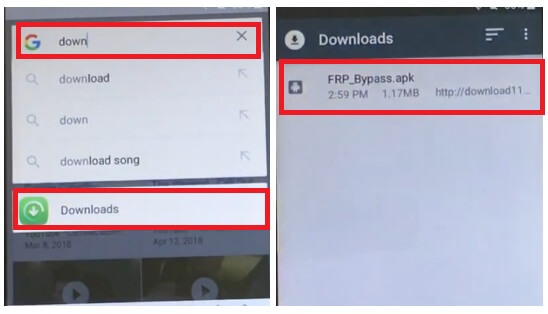
- Tap the “3 dots” from the top-right corner and select Downloads

- Now install FRP_Bypass.apk, by tap install => Open

- Tap “3dots” and Select Browser Sign IN
- Now Sign In with a Google Account ID password

- Restart your Celkon Millennia Hero
- Setup all initial steps
- Now you will see Account Added, which means FRP is successfully bypassed
- That’s it.
Read More: Celkon Millennia Everest FRP Bypass Reset Google Gmail (Android 5.1) Free
