![FRP Bypass APK Download (2024) - Latest FRP Bypass [Android]](https://bypassfrpfiles.com/wp-content/uploads/2021/07/FRP.jpg)
FRP Bypass Apk is a free and simple Android application that helps to unlock Google Account verification lock from Android phones without using PC. Basically, It provides you a seamless and effective solution to access devices settings and apps to bypass FRP lock without using PC on FRP-protected phones.
If you have recently performed format data or reset the phone and stuck on the FRP lock verification screen, then you can Download FRP Bypass apps & use shortcuts to unlock Android 5.1 to Android 14 version phones easily.
Download FRP Bypass APK


- Alliance X Shield: Download
- Google App Settings Access: Download
- Shortcut Maser LITE 1.2.3: Download
- Sidebar Lite 4.4.0: Download
- Menu button: Download
- Account login: Download
- Android 8-9 GAM APK: Download
- Package Disabler Pro: Download
- FRP_Bypass.apk: Download
- Clear data not Supported XML File: Download
- Notification Bar: Download
- Package_Manager.apk: Download
- Activity Launcher: Download
- Bar_Settings.apk: Download
- Xshare APk: Download
- Testdpc 4.0.5: Download
- Amazon Offers: Download
- Huawei Phone Clone APK: Download
- HushSMS apk: Download [Guide]
- Apex Launcher: Download
- Google Play Services 13.2.78: Download
- Google play services: Download
- Bypass_any_Samsung Google Account Lock: Download
- Launch Google Settings v1.0: Download
- Development Settings v1.7.1: Download
- FRP_vn_ROM: Download
- Samsung Smart Switch apk: Download
- Quick Shortcut Maker 2.4.0: Download
- QuickShortcutMaker 2.0: Download
- Pangu_FRP: Download + Guide
- File Commander APK: Download
Read More: Download QuickShortcutMaker APK (All Version) – Latest
What is FRP?
FRP Bypass Apk is a tool that enables users to bypass the Google Account Verification lock from any Android version for free. Basically, with its help, you can access system applications and download all useful FRP apps to directly access the installed apps to remove Google Lock easily.
You can use FRP Apps on any Android phone that runs on Android Lollipop 5.0, Marshmallow 6.0, Pie 9.0, Nougat 7.0, Oreo 8.0, 10 Q, 11, 12, 13, and most importantly Android 14 phones for free.
What’s New:
- Latest version updated to v2.0.
- Added Browser Sign IN.
- Support Latest Android version.
- One click direct Open Devices apps.
- Improvements.
- Bug Fixes.
How to use
- Download FRP Bypass Apk latest version to your phone.
- Then Open the File Manager using Open Files app.
- Then find the Apk and tap on it.
- Install & open the apk.
- Go back to the device browser.
- Tap on the Search bar and type any of these two below URL’s.
- Go to the FRP Apps section.
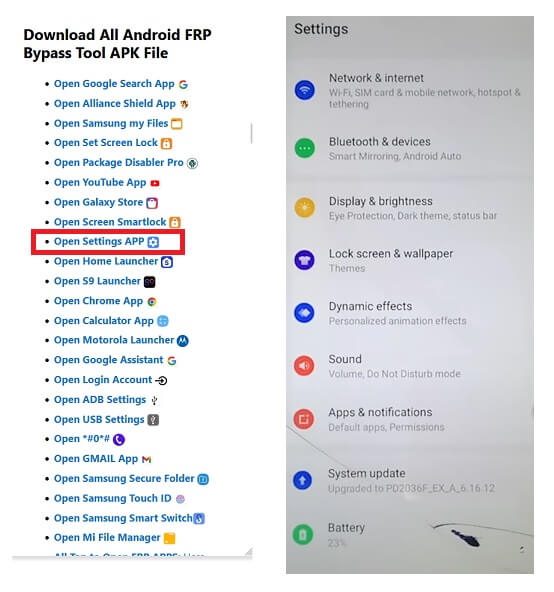
- Select Open Settings App =>> Tap Open.
- Now it will lead you to the device Settings app.
- Go down & select System Settings.
- Tap on Backup & Reset => Reset Phone.
- Now Tap on Reset System Settings Only => Confirm Reset System Settings Only => Reset. System Settings Only.
- Then Select Erase All data => Confirm Erase Data => Erase Data.
- Your device will be rebooted.
- The factory reset process will begin.
- Wait for 3-4 minutes.
- Then the device will boot automatically.
- Setup all initial steps on your Android phone.
- That’s it.
- You have successfully unlocked the FRP verification.
Read More: Download Android GAM APK All Version for FRP Bypass (6, 7, 8, 9, 10)
Read Me:
FRP (Factory Reset Protection) is basically a built-in security feature for all Android phones. This primarily protects the data of the original owner during and after thefts. If you factory reset the phone, then You’ll require to log on with the last used GMAIL ID Password. Otherwise, it will be stuck on the verification screen.
In this thoroughly written guide, we have shared the download link to all the latest useful FRP Bypass Apps and tools for 2024 with complete guidance to unlocking Google Account verification from your phone without using a computer.
Checkout: FRPFILE Bypass Apk – FRP Bypass File Android Download Direct Android

