![Easy Samsung Frp Tool v1, v2, v2.7 2024 Download [Latest Version]](https://bypassfrpfiles.com/wp-content/uploads/2020/08/Easy-2-.jpg)
In this blog, we will provide links to download Easy Samsung FRP Tool 2023 V1, V2, V2.7 latest versions along with simple instructions to get a “VIEW and CANCEL” popup to access the browser through the YouTube app on your Samsung FRP Phone.
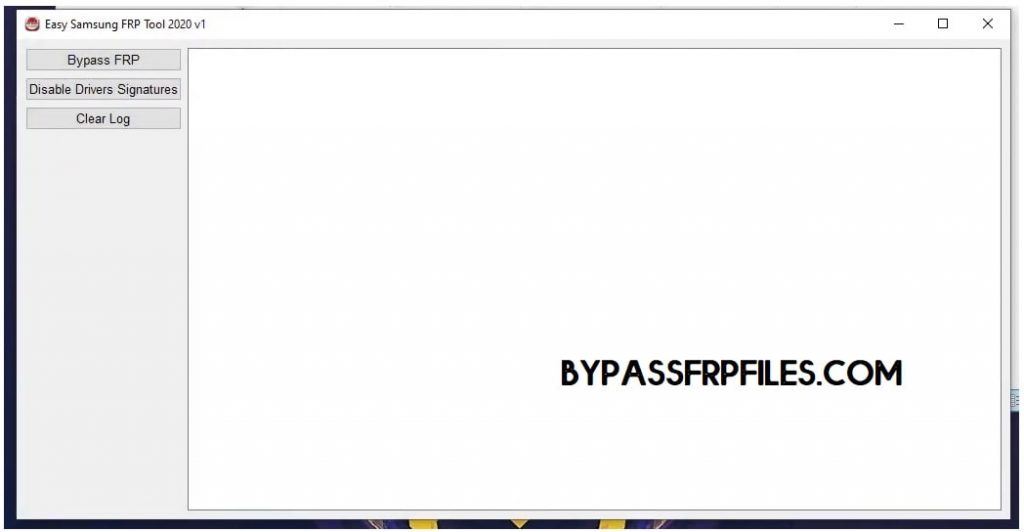
FRP is a built-in security feature coming with all latest Android devices. It basically protects the phone after performing a factory reset or formatting data on the device. If you buying an old Samsung phone or have forgotten the login details then you will face FRP lock issues. Luckily, Easy Samsung FRP Tool can help you to bypass or unlock the Samsung Android phone.
What is Easy Samsung FRP?
Easy Samsung FRP Tool is a free & Widely-used Windows program specially designed for simplifying the process of Bypass FRP Google Account Verification on any Samsung Android 12, Android 11, Android 10 Q, Android 9 Pie, Android Oreo, Android 6.0 Marshmallow, version phones by accessing the Chrome Browser.
The procedure of using the tool is quite simple. All you have to do is, connect your phone to a Wi-Fi network and run the tool on your computer, then connect your phone to the computer via USB and click on Bypass FRP.
Features:
- Remove or Bypass all Samsung Galaxy OneUi Factory Reset Protection (FRP) lock.
- Directly Access Web browser, such Chrome or Samsung Internet to download FRP apps
- Bypass FRP lock without a password.
- All Samsung Galaxy devices supported
- MTP Mode FRP Unlock
- 100% free Tool
- 100% free FRP Unlock tool.
- Remotely access Web Browser and unlock FRP
- Virus-free.
Read More: Easy Firmware Easy Samsung frp tools v2.7 download – latest Version Free
Download Easy Samsung FRP Tool 2024 V2.7 Latest Version
File Name: Easy_Samsung_FRP_2020_V1.zip
Size: 12MB
Type: .exe
Compatible OS: Windows 7, Windows 8, Windows 10, Windows 11 (32&64bit)
Developer: Easy Firmware Team
| Software Details | Links |
|---|---|
| Easy_Samsung FRP 2020 V1 | Download |
| Easy_Samsung FRP_2021 V1 | Download |
| Easy_Samsung_FRP_2021_V2 | Download |
| Easy_Samsung_FRP_2024 V2.7 (New) | Download |
Read More: Samsung FRP Tool – Best FRP Tool to unlock Any Samsung phone
Join me on Telegram to receive android updates, Android Tools, tricks,
Whats New:
- Updated to the latest version 2.7.
- Improvements.
- Bug fixes.
- Added Latest Samsung models.
- Added Disable Driver Signature.
- Added FRP Site.
Disable the Antivirus Protection first, otherwise, you wouldn’t be able to use this Samsung Easy FRP Bypass V1
How to Use Easy Samsung FRP Tools
- Download the Easy Samsung Frp Tool 2024 Bypass new Tool on your PC.
- Extract it with 7zip or WinRar.
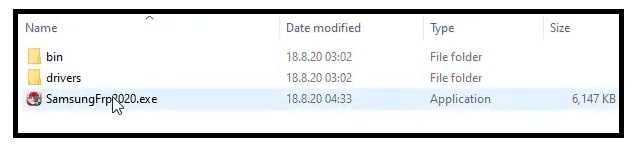
- Double click to run SamsungFrp2023.exe.
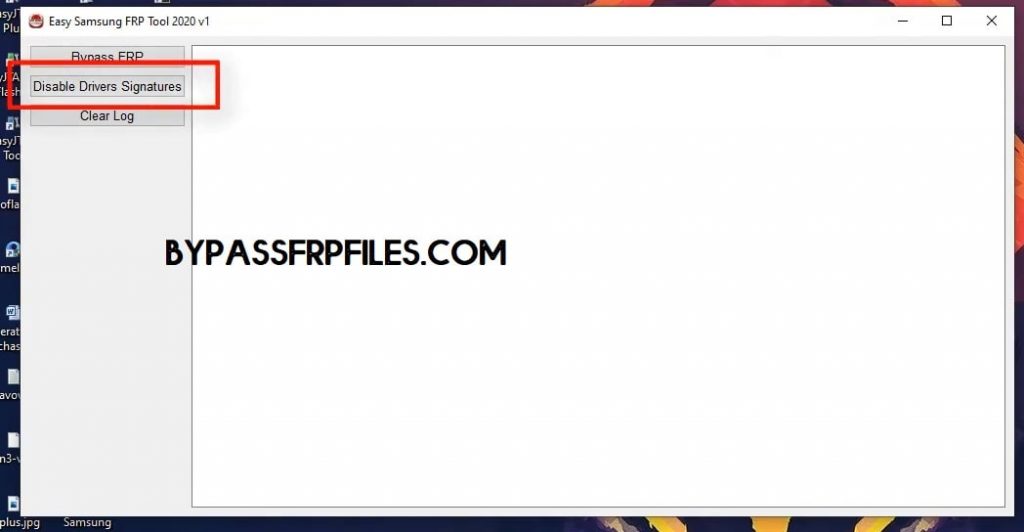
- First Step: Click on Disable Driver signature enforcement.
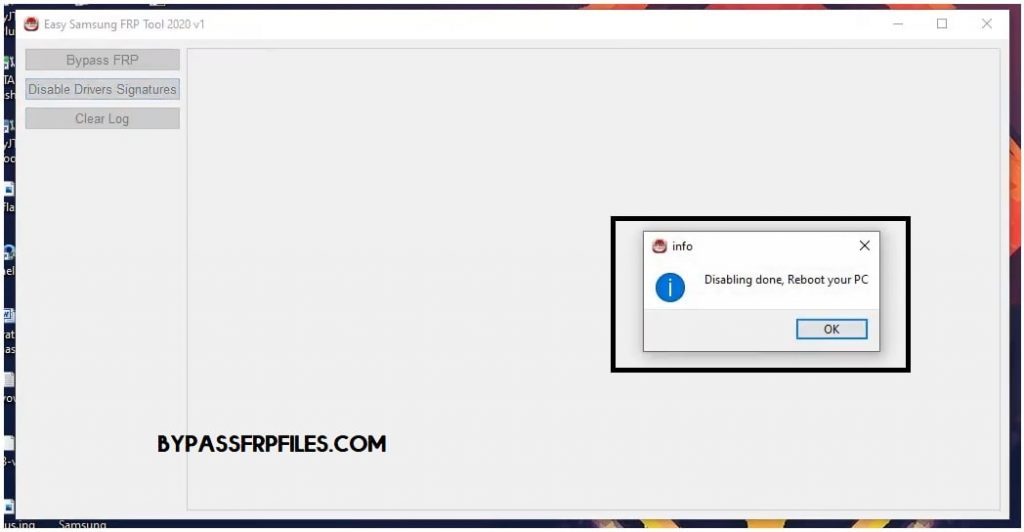
- Restart Your Windows Computer.
- Reopen the SamsungFRP2022.exe setup file tool.
- Now you have to connect your Samsung mobile to a good wifi network.
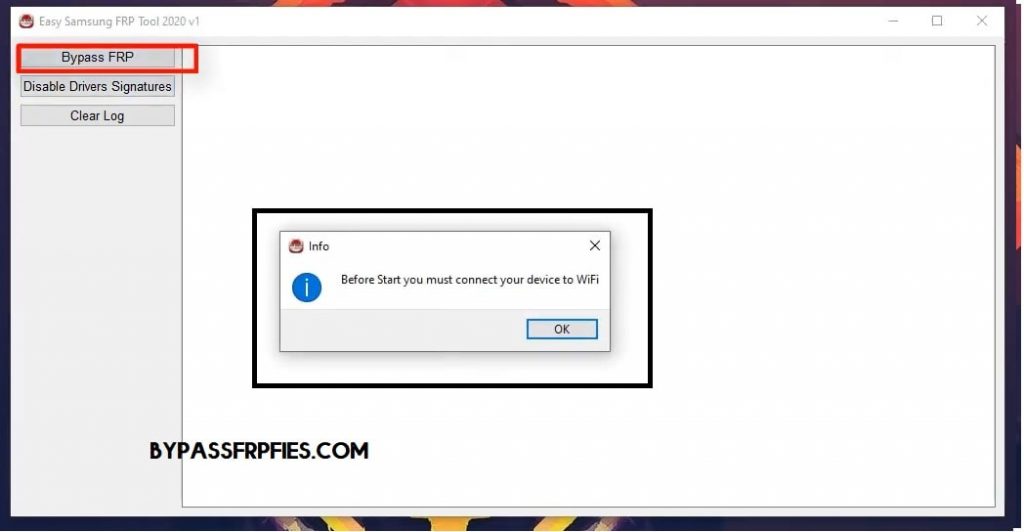
- Then connect your Samsung phone to the computer.
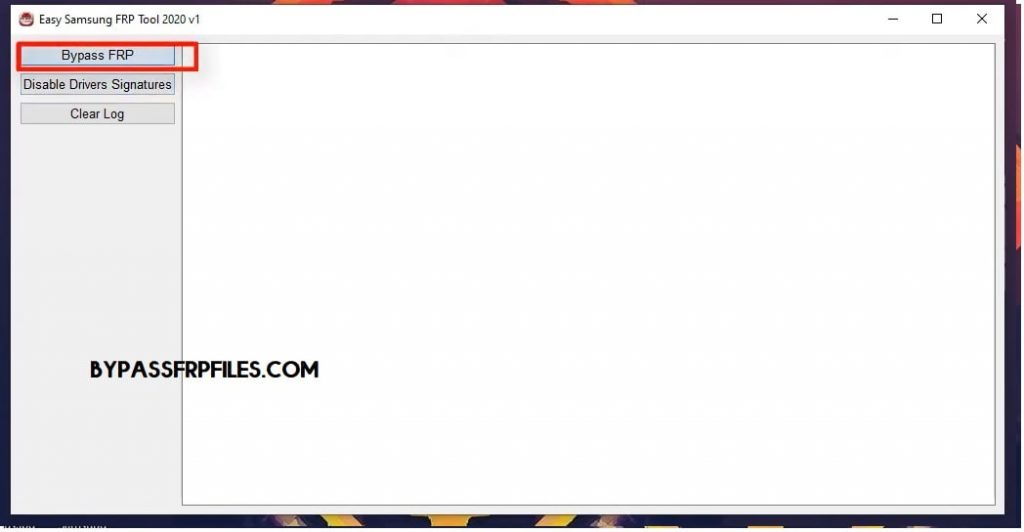
- Second Step: Click Bypass FRP.
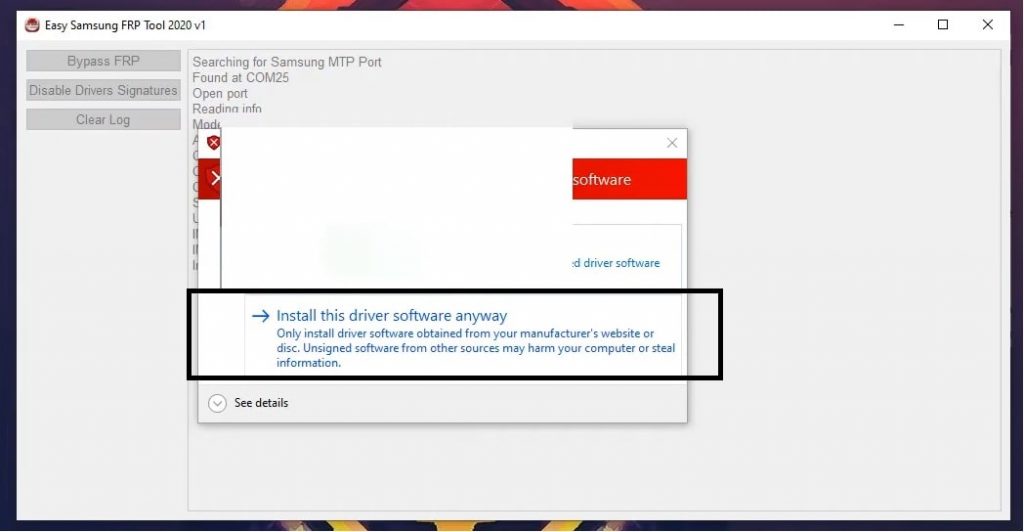
- Wait until finished.
- A Driver installation popup will open, click Install Anyway.
- Check on your phone, A Easy Firmware popup window will appear.
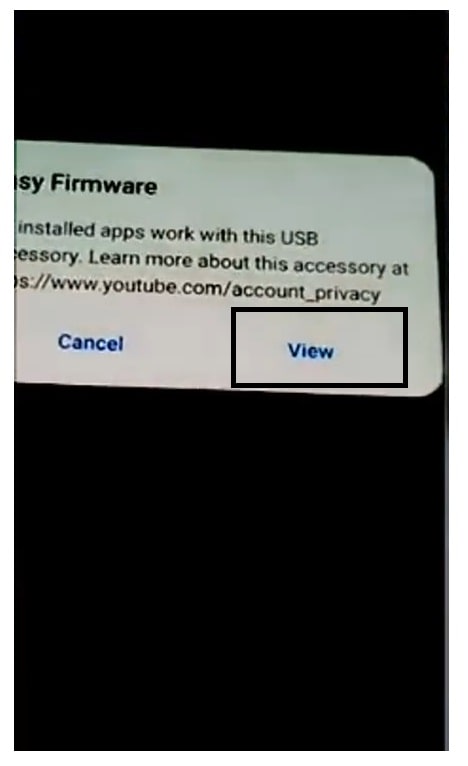
- Tap on View.
- Now a chrome browser window will open.
- Type the below link:
- Download FRP bypass Apk (2020).
- Install and Open the application on your phone.
- Click Bypass FRP and choose Settings.
- Goto Security : >> Enable Pin Windows and set up a Pattern lock there.
- Reboot your phone.
- That’s it.
If the above FRP method not working for you then check our All Samsung FRP Bypass methods.
Fix Installing Drivers Failed
If you want to fix Easy Samsung FRP Tool Installing Drivers Failed problem, then the below following steps can help you to fix the problem easily.
- First download and extract the Setup file on your PC
- Now download & Install Samsung USB driver
- Follow the on-screen instructions to completely install the driver on your PC
- Click Next =>> Agree =>> Install
- Search CMD & Run it as Admin
- Copy and Paste the following code on CMD
bcdedit /set TESTSIGNING OFF
- Restart Your Windows Computer.
- Now run the SamsungFRP.exe
- Connect your FRP enable phone to PC
- Click on Bypass FRP
- You have successfully fix the Installing Drivers failed.
- That’s it.
Fix Easy Samsung FRP Tool Failed Launching browser event
Did you face the Launching browser failed problem with your Easy Samsung FRP V1 then following these steps will help you to fix the problem easily on your computer or laptop.
- First, download & Install Samsung USB driver
- Click Next =>> Agree =>> Install
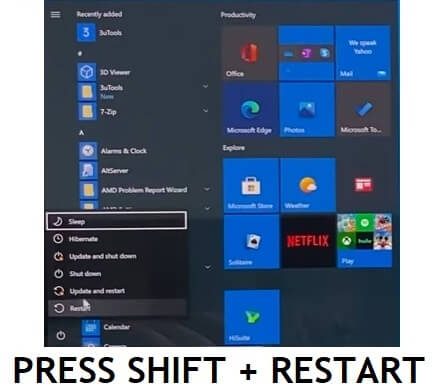
- Open Start menu =>
- Select Power Options
- Press & Hold Shift Button and Press Restart
- Your PC will be restarted and Boots with the Safe mode menu
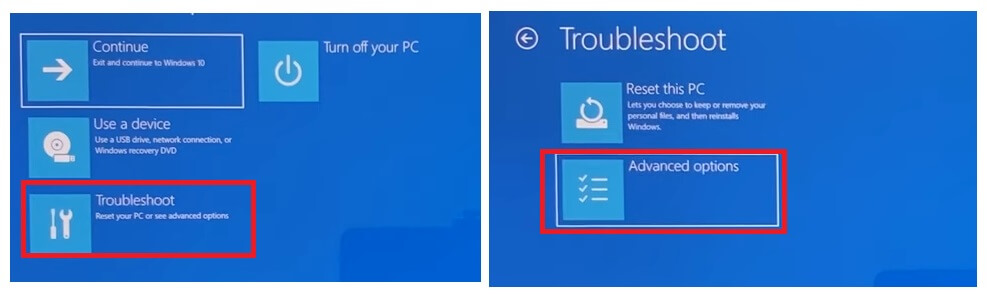
- Click on Troubleshoot =>>> Advance Options
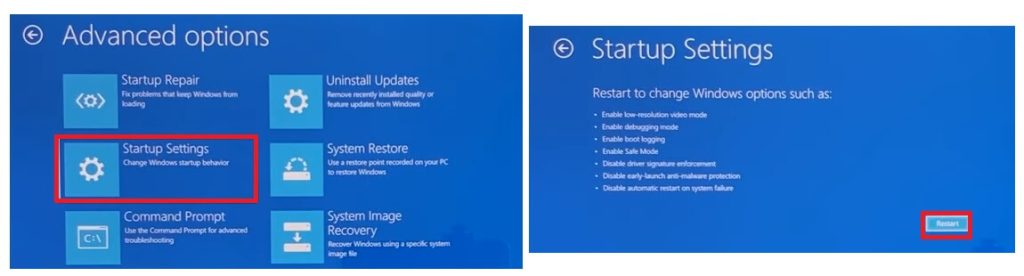
- Then Click on Startup Settings =>> Restart
- The Startup Settings will appears
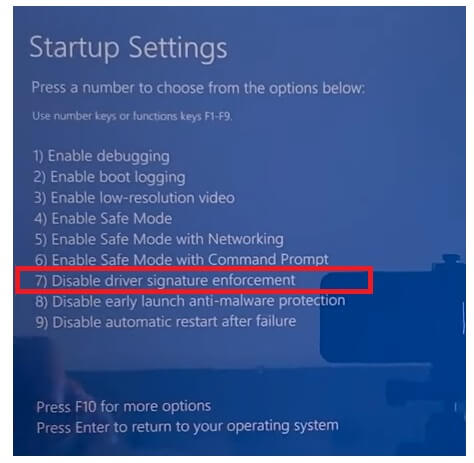
- Press 7 to select Disable Driver Signature enforcement
- Your Computer will be rebooted
- Now re-extract the FRP tool Setup file
- Connect your Samsung device to PC
- Click On Bypass FRP
- You have fixed the Launching Browser problem successfully.
Read More: Z3x Samsung Tool pro latest Setup & Z3x Samsung Tool Pro Crack
I am really glad to help you out. Thanks a lot for visiting.

