
Vivo Y91 Unlock File is a simple and effective solution to remove Pattern, Password, and Pin screen lock from your phone in just one click for free through the QPST QFil Flash tool. Pattern Lock (Screen Lock) is an inbuilt data protection feature for all present-day Android smartphones, It protects phones from unauthorized access. If you forget the pattern lock on your phone, then follow these steps and download Vivo 1816 Pattern Password Pin Unlock File & QPST Flash tool to Remove the Screen lock for free.
Screen lock is a basic protection lock for Android phones, You can enable it through device settings =>> Security & Lock Screen menu. It has plenty of options like Pattern, Password, Pin. Nowadays, Android has enhanced screen lock protection by added Fingerprints and Face Lock options. Once you have enabled the screen lock on your Android phone, then you must enter or draw the same Password, Pattern, Pin lock, Fingerprint to access the device once again.
In this scenario, If you have forgotten the Pattern Lock of your Vivo Y91 phone and you want a quick solution to unlock your phone, Then follow these simple steps and download Vivo Y91 Qualcomm Pattern Unlock Files to Remove the Screen Lock from your phone.
If you want FRP bypass tool & FRP APK according to your phone to unlock FRP Factory Reset Protection, Then check here to download Realme X7 Pro FRP File to unlock FRP for free.
More: Download Vnrom FRP Bypass Apk | One-Click Google Unlock Free
How To Disable Screen Lock Protection
If you want to disable the Screen lock feature from your Vivo Y91 then you need to delete or turn off the lock screen from the device Settings. follow the below process completely to disable the Screen Lock Protection successfully: go to the settings menu=>> Security & Lock Screen =>> Select Screen Lock =>> Disable =>> that’s it.
Bypass FRP File not responsible for any damage on your device please try this at your own risk.
Download Vivo Y91 Unlock File With Tool Free
You can easily download Vivo Y91 1816 Qualcomm Remove Password, Pattern File free with no password from here. It is exclusively available only for all bypassfrpfiles.com visitors.
File Name: Vivo_1816_Unlock_File.zip
File Size: 4MB
Type:.zip
Download: Remove File [PASS: BYPASSFRPFILES.COM]
Flash Tool: Download QPST Flash Tool
USB Driver: Qualcomm USB Driver
How to Unlock Pattern, Password Vivo Y91 with QFil Tool
- Download & extract the Vivo Y91 1816, 1815 Unlock file to your computer.
- Then Download & extract the Qfil tool

- Open the tool folder and Run Qfil.exe
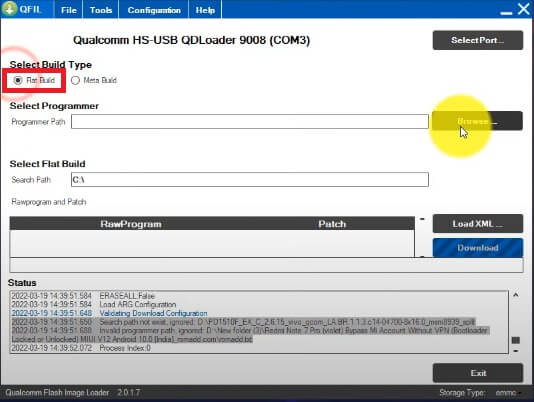
- Tick on Flat build

- Click on BROWSE from the Select Programmer path tab
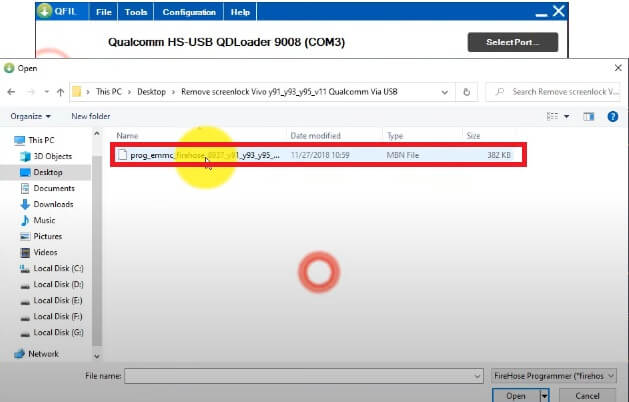
- Choose the prog_firehose_fwupdate.mbn
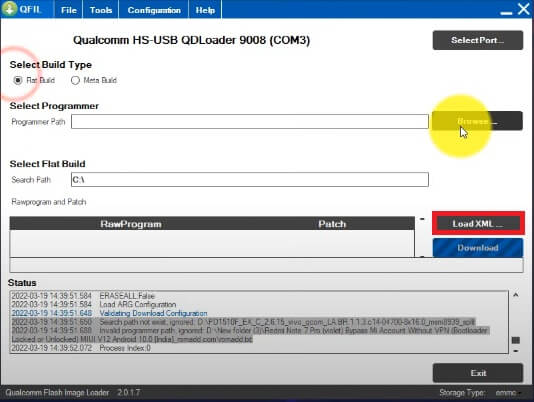
- Then click on Load XML
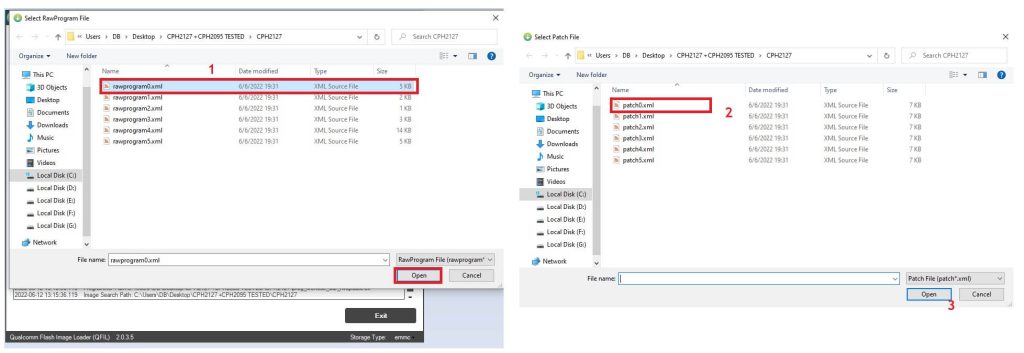
- Select RawProgram0.xml & Patch0.xml file
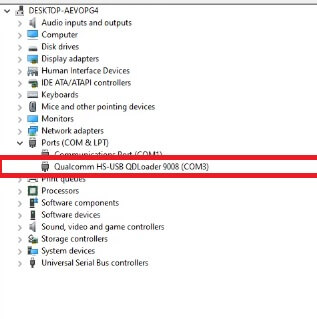
- Open Device Manager on your PC
- Now Power Off your Vivo Y91
- Put your device in EDL Mode
- Remove Back panel of the phone
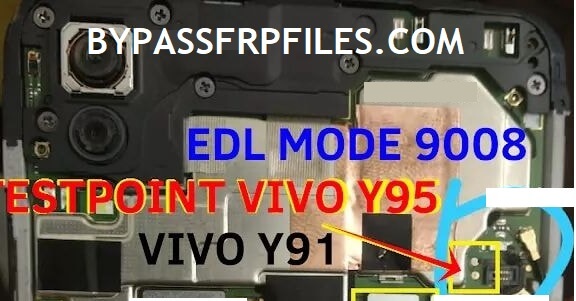
- Then check the below image and short the pinouts to put successfully into the EDL Mode
- Go back to the Qfil tool

- Select the Comport by clicking on the Select Port tab
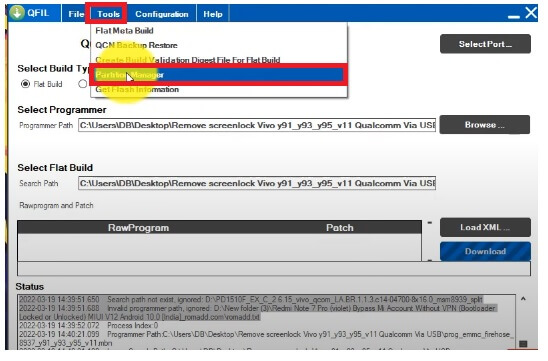
- Now click on Tools tab
- Then Select Partition Manager =>> OK
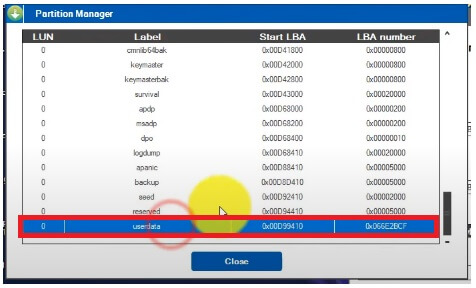
- It will take some time to read your device Partition table
- Once done, you will get the Partition details of your phone

- Go down and select USERDATA partition
- Right click on USERDATA Partition & Select Manage Partition Data
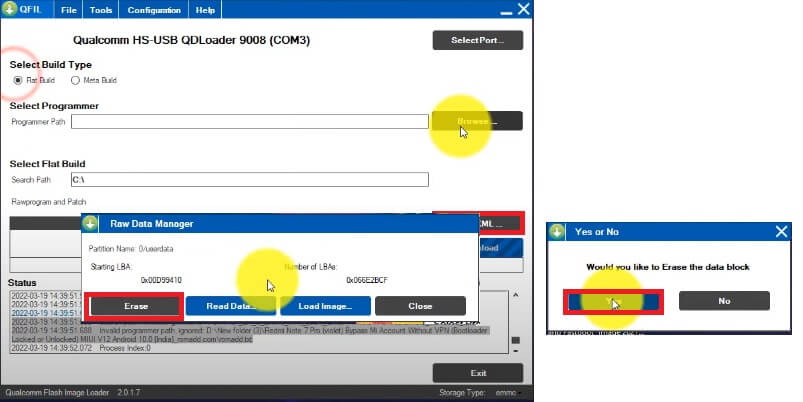
- Click on Erase =>> Yes
- It will erase the Userdata partiton of your phone
- Once you get the success message
- Disconnect & Power On your Vivo Y91
- That’s it.
Read More: Vivo Y95 Unlock File Download (Remove Pattern Password Pin) – QFIL Flash Tool

