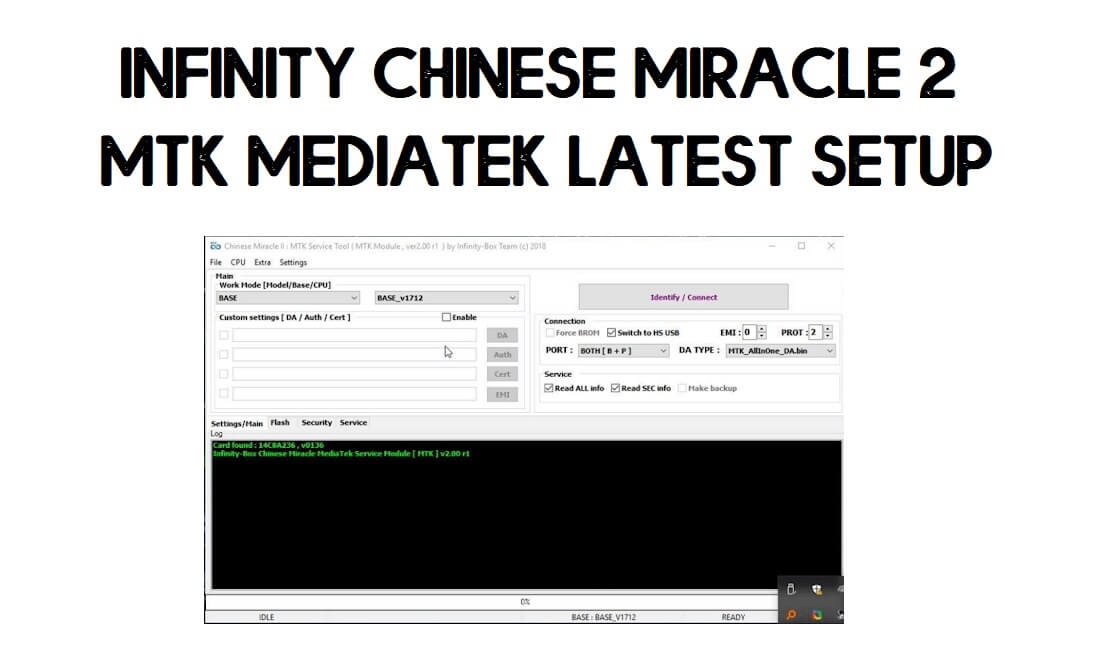
Download Infinity Chinese Miracle 2 MTK v3.15 (Infinity CM2MT2 Setup) Latest Update

Photo of author
Updated on:
Follow

Infinity Chinese Miracle 2 MTK v3.15 (CM2MT2 Setup) is built specially for MediaTek (MTK)-based Android devices. It helps GSM technicians or users to fix software problems, unlock phones, and repair MTK-based smartphones easily.

In this article, we provide complete details on What is CM2MT2? The latest version added more features, quick unlocking operations, and supported devices & a step-by-step guide to activate it on your Windows for unlocking & reparing any smartphones easily.

Read: MFT Mobile Fix Tool

What is Infinity CM2MT2?

The Infinity Chinese Miracle 2 MediaTek v2 module or CM2MT2 is a simple dongle-based Android repair utility from Infinity team that especially developed for MediaTek MTK-chipset based smartphones and tablets.

Do check: SamPro Tool

The CM2MT2 Tool setup enables you to Read information, Unlock FRP, Unlock Accounts, Remove Password lock, Unlock Bootloader process is fast and secure, you don’t even need to use any Auth or buys Credits.

Flash Tab in Infinity CM2 Dongle Latest Setup Tool, Infinity Chinese Miracle 2 MTK

All you have to is, first, download the latest setup to your computer and run it then select the option you want, connect your phone to the computer, then click on Start, that’s it.

Read More: Download Z3x Samsung Tool Pro Latest Setup (All Versions) for Free

Features:

Flash or Backup Firmware: The CM2 MT2 tool let you flash stock ROMs or take old ROM’s backup to install or update the current OS of the phone.

Reset Screen locks: It can easily handle any MTK-based Android phones to Remove FRP, Reset screen locks (Pattern/Password/Pin), or privacy locks easily.

Repair IMEI: Face IMEI 0 or Null? then the tool has capabilities to repair IMEI issues easily.

MDM Unlock: Also the infinity CM2 MT2 latest Setup allows you to unlock MDM (Mobile-Device-Management) locks on MediaTek-based Android smartphones and tablets easily.

Do check: T Tool Pro

Here, We share the link to download Chinese Miracle 2 MTK latest Setup tool all version for free, you have to use CM2 dongle to use the tool without any interruptions. We will update links whenever an update release.

Setup Name: Infinity_CM2MTK_Setup.zip
Version: 3.15
Size: 300Mb
Password: 1111
Telegram: t.me/droidsolution

File NameLinks
CM2MT2_v2.77Download [Pass-1111]
CM2MT2_v2.76Download [Pass-1111]
CM2MT2_v2.61Download
CM2MT2_v2.60Download [Pass-1111]
CM2MT2_v2.59Download [Pass-1111]
CM2MT2_v2.57Download
CM2MT2_v2.54Download
InfinityBox_install_CM2MT2_v2.52Download
InfinityBox_install_CM2MT2_v2.45a6Download
InfinityBox_install_CM2MT2_v2.23.7zDownload [pass 12345678]
InfinityBox_install_CM2MT2_v2.22.zipDownload
InfinityBox_install_CM2MT2_v2.21Download [PASS- 12345678]
InfinityBox_install_CM2MT2_v1.58Download
CM2MT2_boot-pack_v2.21aDownload
InfinityBox_install_CM2MT2_v2.20.zipDownload
InfinityBox_install_CM2MT2_v2.18.zipDownload

What’s New on Infinity CM2MT2 v3.15:

  • Added new SoC & Database for read device identification
  • Fixed BROM boot process
  • Improved boot stability and compatibility
  • Improvements
  • Bug fixes

Digma models

  • Digma Vox G501 4G
  • Digma Optima 7.7 3G
  • Digma Optima B19 1025N 4G
  • Digma Plane 1550S 3G
  • Digma Citi 1508 4G
  • Digma Platina 1579M 4G
  • Digma Plane 8522 3G
  • Digma Optima 1245C 4G
  • Digma Plane 1523 3G
  • Digma Plane 1526 4G
  • Digma Optima 1507 3G
  • Digma Citi Kids CS7216MG
  • Digma Citi 1590 3G (CS1207MG)
  • Digma Optima 8019N 4G (TS8182ML)
  • Digma Citi Kids 81 (CS8233MG)
  • Digma Optima 10.1 3G
  • Digma Infinity
  • Digma Plane 1551S 4G
  • Digma Empire TA3E2M01
  • Digma Linx X1 3G
  • Digma Optima 10.2 3G
  • Digma Plane 7.4 4G
  • Digma Hit 3G
  • Digma Citi 1544 3G
  • Digma Optima 1315T 4G
  • Digma Citi 7591 3G

Install CM2MT2 Setup:

  • Download & extract the CM2 MTK Dongle Setup tool to your computer
  • Connect the Dongle to the PC
  • Run the InfinityBox_install_CM2MT2_v3.15.exe
  • Tick on I accept the terms of the License Agreement
install CM2 Dongle Setup
  • Click on Next =>> Next=>> Install
  • Install process will beginning
  • It will take some time
  • Again Tap on Next
  • Tick on I Accept the Agreement and Click Next
  • Now launch the tool

Read More: Download MRT Dongle Latest Setup v3.95 | MRT KEY Tool Update Free Setup

How to Use Infinity Chinese Miracle 2

1. Open the Infinity CM2 Tool

2. Now you can use the below functions to fix or repair your phone

Infinity CM2 Dongle V2.21 Latest Setup Tool, Infinity Chinese Miracle 2 MTK

Smart Functions:

  • Select Device Brand
  • Select Device Mode or Chipset Version

Connect your phone to the Computer in Meta/Download/EDL/Test Point mode

Click on Identify/Connect

Flash Tab in Infinity CM2 Dongle Latest Setup Tool, Infinity Chinese Miracle 2 MTK

Flash Firmware:

  • Flash Settings: Tick the Option => Select Flash File => Flash
    • Update PMT
    • HW Compatibility
  • Safe Erase (Upgrade)
    • Backup
    • Checksum verify
    • Extended Mode
  • Flash Format

Flash Read (FW maker)=> Tick on =>> Read FW

  • Pack FW
  • Force Read
Service menu in Infinity Chinese Miracle 2 MTK CM2 MTK

Security (Network Unlock)

  • SP Unlock
  • Read NVRAM
  • Reset (Restore) Simlock
  • Model Unit (NVROM Fix)
  • Write NVRAM
  • Repair Baseband
  • Upload KN Tee/Google
  • Repair Security
Download Infinity Chinese Miracle 2 MTK CM2 MTK

Service (Unlock/Format)

Factory Reset Settings =>> Reset Settings/ Format FS

  • Smart Reset
  • Mise=>> Fix DL
  • Userdata & locks
  • Reset User locks
  • Reset Privacy Locks

Recover Phonebook

  • Read Pattern Lock
  • Text/Extra/HW
  • HW Report
  • Request PL
  • Memory Test
  • UFS Mode

Read More: Miracle Box Latest Setup | All Miracle Thunder Update Version

Added Devices:

BrandSupported Models
AcerLiquid-Z6
TCL8196G
WaltonOrbit-Y50, Orbit-Y11
FacetelQ7
XanonX20
AmazonFire-7-2015-Gen-5 (Ford-KFFOWI)Fire-7-2017-Gen-7 (Austin-KFAUWI)Fire-HD-8-2017-Gen-7 (KFDOWI)Fire-HD-10-2019-Gen-9 (Maverick-KFMAWI)Fire-TV-Stick-2016-Gen-2 (Tank-LY73PR)Echo-Show-5-2019 (Checkers-H23K37)Echo-Show-8-2019 (Crown-C7H6N3)
MC-MobileSlim1
LenovoX2
CubotX100
CondorAllure-M3, Griffe-T8-Plus, GT60, GT60-Pro, GT70, Mate-70, Nova060, Nova-60i, Nova-70s, SP531Allure-M1, M1-Plus, M2Plume-L1, L2, L1-Plus, L3, L3-Smart, L6-Pro, L8-Pro, L5-Pro, L5Allure-A8-ProTB105L, TB109L, TB717G, TB717L, TB802L, TCV703GTFX708G, TFX711G, TFX712G, TFX713L, TFX714L, TGW801L
Mione4, 8, A1, A30, A50, A55, A60, A66, A70, A80E2, E88Hero, Hero-1, Hero-2, Hero-4, Hero-5Hot-1, Hot-2, Hot-3I11, I13-Plus, I-A60, IIIK1, K2, K3, Kids-Pad-1M1, M9-Mini, M20, M50, Mate9-Pro, Max, Max12Mi12, Mi88, Mi99, MiPad, MiPad-TabN10-Pro, N10-Pro-1SP1, P1-Plus, P8Q1, Q3, Q5, Q7, Q8, Q8-Plus, Q9, Q10, Q11, Q13R1S, R3, R5S2X, X1, X2, X3, X10, X8-Pro
Bebe-TabA4040, B68, B69s, B71, B77s, B78, B80-Plus, B82, B703s, B787, B2020
ModioB58, M1–M4, M6–M9, M11–M12, M17–M22, M26–M28, M32, M41, M51, M55–M56, M58, M91M112, M116, M118, M120, M122–M123, M126, M131M710, M730, M780, M790–M792P709

Conclusion:

The Infinity CM2MT2 is a powerful yet one of the OG products that still provided extraordinary solution to bypass FRP, Flash firmware, repair any MediaTek-based Android smart and feature phones easily. Make sure, it will require a dongle to use on Windows computer.

[*] Caution: This method is for device owner and only for educational purposes, meaning trying this method on a stolen device is a serious crime, it may lead you to the jail.

[*] Warning: BypassFRPFiles.com not responsible for any damage on your device please try this at your own risk.

Alternatives: Also, you can use premium & freebie tools to unlock Samsung phone. You can head over to our, Griffin-Unlocker, Phoenix Tool, UnlockTool, etc.

Share on:

I write about Android FRP Solutions, Android problems, GSM tutorials. If your device stuck at the Google Account Verification screen then here you can find all the possible ways to Bypass it. In my free time, I love to play games:

Recommended Reading…