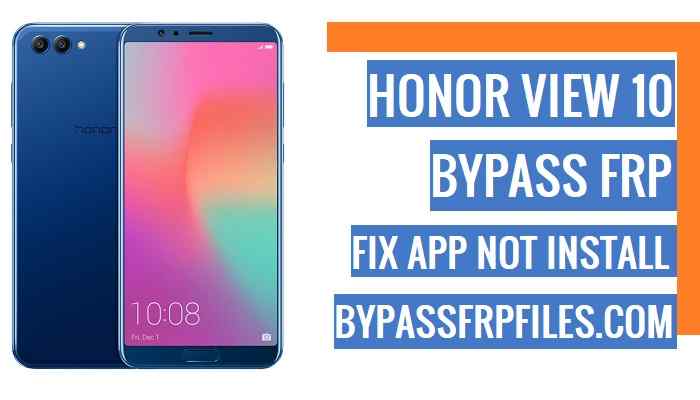
Nowadays big challenge is FRP Bypass on Android Phones, all Android phones security are updated now, so that’s why we also updated and try new methods to Bypass FRP, now we are here share with you another latest method to Bypass Honor View 10 FRP, a few months back we published an article about how you can unlock FRP Huawei View 10 (BKL-L09) FRP but with the latest updated security patch that does not work anymore, because now you can’t install any app while FRP lock is on, so again we share the latest once again step by step.
Make Sure:- This process only for the device owner,
Attention: Bypass FRP Files not responsible for any damage on your device please try this at your own risk.
Note:- This method we tried to Bypass Honor BKL-L09 FRP. but you can also try this method to all Honor View 10 FRP.
Let’s start to Bypass Honor BKL-L09 FRP
-First of all, power on your device first.
-Now tap on next and Connect your device to any working Wifi Connection.
-Once you connected your device to a working wifi connection then restart your device by pressing the power key.
-wait for “power on“ your device.
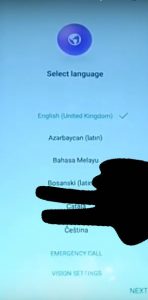
-After that, tap a long time with your “2” fingers on your device welcome screen to enable the talkback option.
-Once you enable talkback features on your device then you will get a talkback tutorial screen.
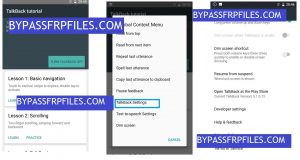
-From the talkback tutorial screen, draw “L” on your device screen to bring “Global Context Menu”.
-Once “Global Context Menu” Pops up. tap on the “Talkback Settings” from that popup.
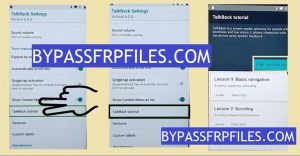
-Once you accessed “talkback settings” now you have to use two fingers to pull down or pull up the “talkback Settings” menu then follow the below steps to access device settings and Bypass Honor View 10 FRP.
-Then Go down below and select the “Talkback Tutorial”.
-Now there you will see “Turn Talkback off”, just tap on “Turn Talkback off” from there.
-Now you have successfully suspended the “talkback” option that helps you to Bypass Honor BKL-L09 FRP.
Open Youtube App to Bypass Honor BKL-L09 FRP
-Once you turned off the talkback option, then you will be redirected to talkback settings again.
-Now from the “talkback settings” screen go down, then tap on the “Help & Feedback”.
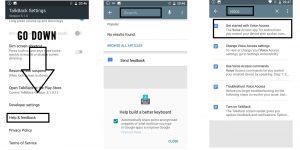
-After that, type “Voice” on top search bar then search it.
-From the result, Select the “Get Started with Voice Access” option.
-Now there, you will able to see a “YouTube Video” on your Screen.
-Just tap on the “YouTube Video” box and wait for a few seconds, until you see some extra sharing options on the youtube video box.
-Then, just tap on the “Youtube video title”, this will lead you to the YouTube application.
Note: If you are unable to tap on the “Youtube Title” then don’t panic just tap on the “Clock” icon beside the youtube video title.
-Tap on that “Clock” icon, then you will redirect to the “Youtube” application.
Make Sure: if your youtube app “update” popup is coming, then just tap on the “Not Now” option from there.
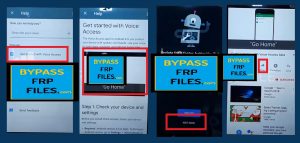
-Now you can easily access “Youtube App” on your device now access device settings to Bypass Honor View 10 FRP successfully,
-Then you will see a video will play, then check below and there you will get the “Share” icon, just tap on that “Share” icon.
-Select the “Gmail” icon from there.
-Now sign in there with any “Outlook, Yahoo, AOL” account.
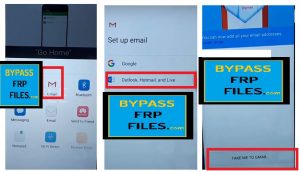
-Once you signed in successfully, then tap on the “Take me to GMAIL”.
-Done, now tap on the “back” icon, then tap on the “3” arrow and then tap on your “mail ID”.
-Now there you will see “manage account” just tap on that,
-After that, you will get another popup, just tap on the “accounts” from there.
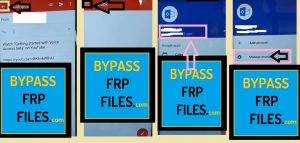
-Boom, now you can easily access your “device settings” to Bypass Honor BKL-L09 FRP.
-Now you need to follow the final step to Bypass FRP.
Final Step to Bypass Honor View 10 FRP
-After that, go down to the settings main menu and tap on the “System” option.
-Then check below and select the “Reset” option.
-Now select “Reset all settings” from there.
-After that, tap to confirm “Reset all settings”.
-Now, wait for “Resetting all the settings”.
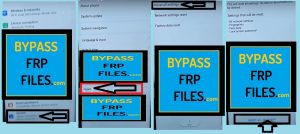
-Once completed, then go back to the device home screen by tapping back key.
-After that, open any “Google” app and sign in with your Gmail id.
-Done, now you have successfully Bypass Honor View 10 FRP.
Check Some Other Tutorial
Thanks for visiting us, if you facing any problem with this Bypass Honor BKL-L09 FRP (Honor View 10 FRP), comment us below.
