

On this page, we’ll guide you on how to unlock Google verification Lock on Tecno Spark Go 3 KN3 using FRP bypass File. The file comes as zip package containing FRP File, USB Driver, Flash Tool & How-to use manual.
What is FRP Lock?
Factory Reset Protection (FRP) is a security feature that turned on automatically after adding a Google account and protects the Android phone after a factory reset.
If someone performs resetting the phone without the owner’s authorization, the FRP prevents the access and asks to verify the previously synced credentials to keep personal data safe and makes the phone useless.
Also read: Bypass Google Lock FRP on Tecno Camon 30 Premier
⚠️ Disclaimer: This page is provided for informational and educational purposes only. It does not promote or support unauthorized FRP bypass or removal. Always comply with Google and the device manufacturer’s terms & policies to deal with security or verification matters.
Download Tecno Spark Go 3 KN3 SPD FRP Unlock File
Download Tecno KN3 FRP File enables you to bypass FRP Google Account verification lock using SPD Research Download tool easily.
File Name: Tecno_KN3_FRP_File.zip
Size: 1MB
Version: Android 15
Join us on Telegram: t.me/droidsolution
Password: Bypassfrpfiles.com
USB Driver: SPD USB Driver
Flash Tool: SPD Research Download Tool
Also read: Bypass Google Verification Lock FRP on Tecno Pova 6 Neo
How to Tecno Spark Go 3 KN3 Bypass FRP Lock
- Download Tecno Spark Go 3 KN3 FRP Remove File File with SPD research tool.
- Extract the file on your PC
- Now power off your phone.
Run the Flash Tool
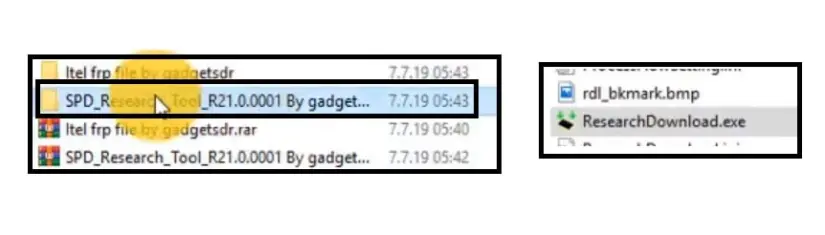
- Open the FRP tool folder and run research_download_tool.exe.
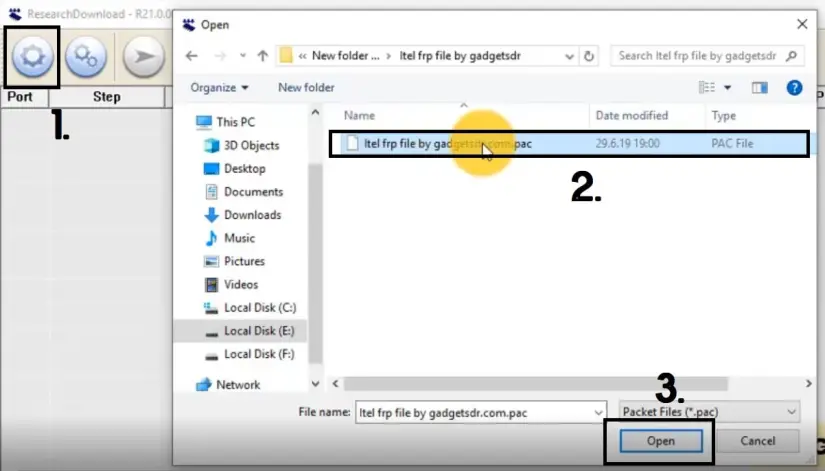
- Click Gear icon and give the file path of the extracted FRP file folder.
- Make Sure, Install SPD USB driver, (Skip this if you are already have done).
Also read: Tecno Camon 30 Pro 5G Bypass Google FRP
Connect your Tecno Spark Go 3 to Windows Computer
- Click Start to begin the FRP Lock removal process.
- Press and hold Volume down and connect your Tecno Spark Go 3 to the computer.
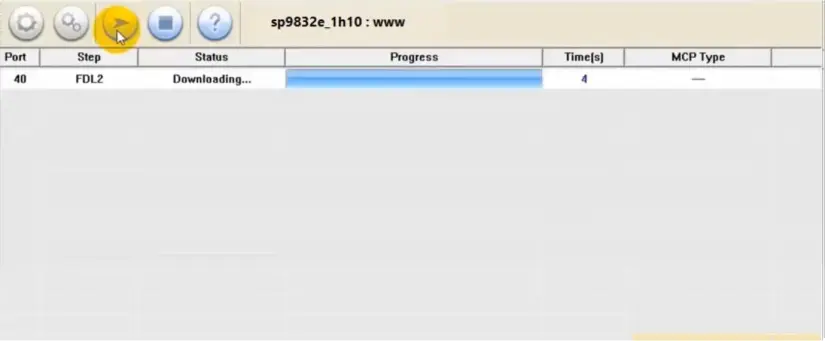
- Wait for the finish.
- Once finish, disconnect and power on your Tecno Spark Go 3.
- That’s it.
Method 2: Tecno Spark Go 3 Unlock with FRP Tool
- First, Download Tecno Spark Go 3 FRP File.
- After that, Download & install the BFT Tool by BossV
- Visit, FRP Tool page for installation instructions.
- Once you’ve done, run BFT.exe as Admin.

- Go to, SPD (UNISOC) tab.
- Select the [AUTH] Unisoc SC9832E from Manual.
- Then, navigate to Service tab & Click Reset FRP.
- Now, power off your Tecno Spark Go 3 & connect to Windows.
- The phone will be detected & bypass the FRP lock.
- That’s it.
More Tecno FRP Guides:
- Tecno Spark Go 2024 BG6M Latest FRP File
- Tecno Camon 30S Pro Bypass FRP Google Lock
- Android Utility Tool
- Bypass Google Gmail FRP Lock on Tecno Spark 20P
Read Me:
This FRP Reset File solution is the easiest solution to Reset Google lock on Tecno Spark Go 3. However, only proceed with caution and use at your own risk as it has some serious consequences.
Booting Process: After successfully performing the unlocking process, the device will take between 1 and 5 minutes to booting completely. After that, you can setup the initial process much like new phone.
Read More: Android Utility Tool
USB Driver: To use the FRP remove file, you’ll need to install USB Driver on your Windows computer to fix connection related issues, head over to our SPD USB Driver page to download the latest version.
Flash Tool: In this guide, we’ve use the SPD Flash Tool for unlocking or flashing firmware on your phone, Also, you can use BFT Best Flash Tool or UnlockTool, TSM Tool, etc.
Alternative Solution: Also, you can use premium & freebie tools to unlock your phone. You can head over to our,
- BFT Best Flash Tool by BossV (Free)
- UnlockTool (Paid)
- King Soft Team Tool
Also read: Bypass Google Verification FRP Lock on Tecno Spark 20 Pro 5G

