If your Xiaomi Poco C75 5G Qualcomm smartphone is stuck at bootlogo, Forget pattern lock, or you are not able to unlock FRP. This page, we will show you Poco C75 5G EDL Test Point to Reboot to EDL Mode 9008 & quickly fix the issue and repair the phone easily.
What is EDL Point?
A EDL test point is a copper points on a PCB that allows you to boot the phone into the emergency download mode to perform flashing, unlocking or repairing the phone.
Read more: Poco F5 Pro (mondrian) EDL Test Point
The Vivo T2 5G EDL point enables the phone boot into the QDloader 9008 mode for flash stock ROM, bypass FRP lock, or reset userdata, etc using any tool.
Read more: Vivo Y18i or Vivo Y18T FRP File
The Poco C75 5G powered-by Qualcomm SM4635 Snapdragon 4s Gen 2 SOC’s & comes with locked USB & bootloader. So, it is impossible to boot the device into the EDL mode without authorization.
Read more: Poco Pad EDL Test Point
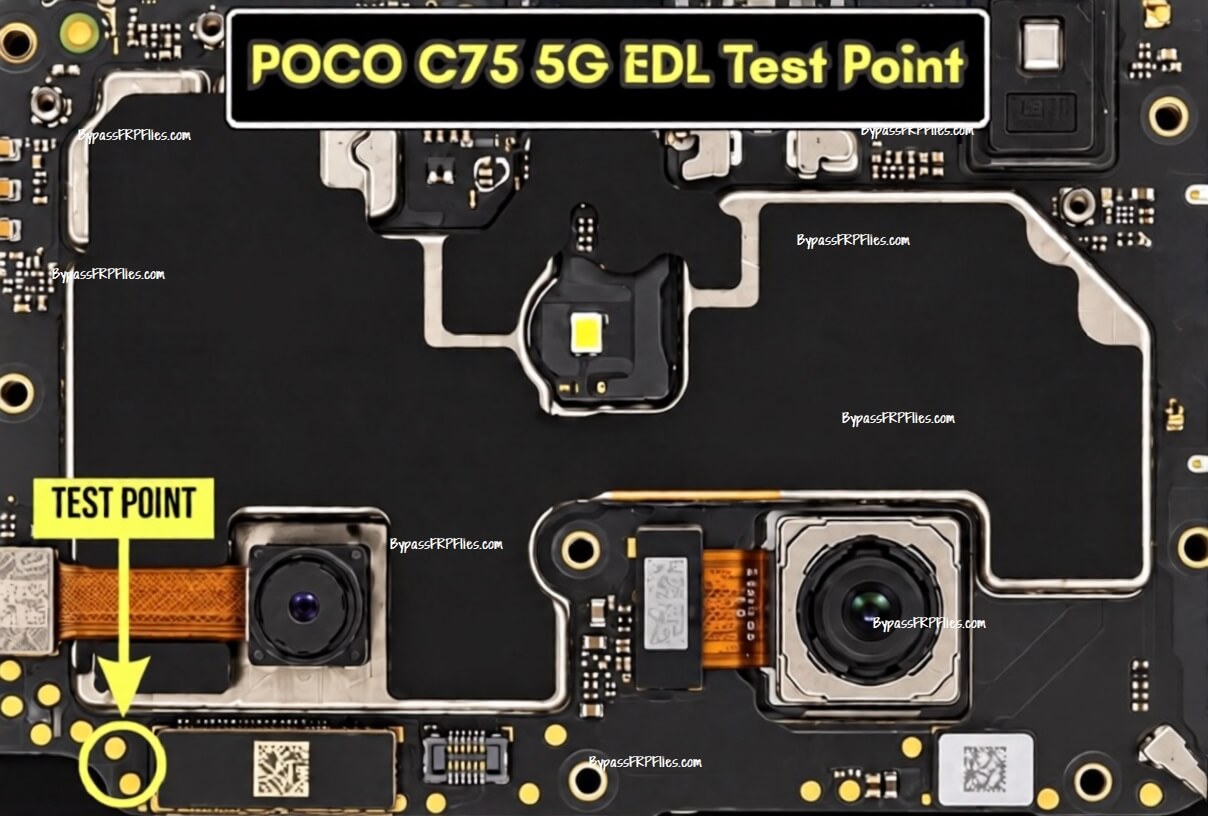
Poco C75 5G EDL Test Point Image:
Here we provide Fastboot, ADB, and Test Point Methods to carefully boot your device into EDL Mode. So, follow the below methods to successfully Reboot your Poco C75 5G to Emergency Download Mode (EDL Mode).
Also read: How to Enter Download or EDL Mode on Oppo Phone
More: QPST Tool – Qualcomm QPST Flash Tool Download Latest All Version
Tip: You can use a microscope or a 10x magnifier to identify the points correctly.
Required Tools for EDL Mode Method
Make sure you have fulfilled the following requirements:
- A tool that supports EDL mode works.
- A tweezers
- Microscope or magnifier
How to Boot into EDL Mode
- Open the back panel of the Poco C75 5G
- Disassemble the phone.
- Locate the EDL point area on the PCB.
- Now you need a Copper Wire or Tweezer to short that pinout
- Once you’re done, connect your smartphone to the PC using a USB cable
- Poco C75 5G EDL point to Hard Reset, FRP Bypass or Flash firmware.
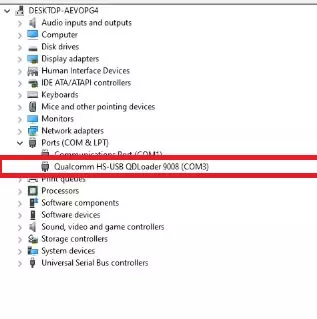
- Now, use any unlock or flashing tool for Qualcomm to fix your phone.
- In the tool, click scan COMPort
- Select the Qualcomm QDLoader 9008 port.
- Bypass FRP: Navigate to the tool functions: Click – Reset FRP
- Fix Dead Boot: Select the firmware & click flash.
- That’s it.