If your Infinix Hot 60 Pro Plus is stuck at Google “Verify your account” screen after a factory reset, Then, you can use the Infinix X6886 FRP remove file to bypass the Google lock and regain access to the device without the old account easily.
What is Factory Reset Protection?
Factory Reset Protection (FRP) is a security feature that turned on automatically after adding a Google account and protects the Android phone after a factory reset.
If someone performs resetting the phone without the owner’s authorization, the FRP prevents the access and asks to verify the previously synced credentials to keep personal data safe and makes the phone useless.
Also read: Infinix Smart 8 (X6525) FRP File
⚠️ Disclaimer: This page is provided for informational and educational purposes only. It does not promote or support unauthorized FRP bypass or removal. Always comply with Google and the device manufacturer’s terms & policies to deal with security or verification matters.
Download Infinix Hot 60 Pro Plus X6886 FRP Remove File
Download Infinix X6886 MTK FRP File enables you to bypass FRP Google Account verification lock using SP Flash tool easily. The procedure will requires Windows computer & the following files.
File Name: Infinix_X6886_FRP_File.zip
Size: 1MB
Android: Android 15
Join us on Telegram: t.me/droidsolution
Password: bypassfrpfiles.com
USB Driver: MTK USB Driver
Flash Tool: SP Flash Tool
Also read: Infinix Smart 10 X6725D Remove Lock with FRP File
Disclaimer: Bypassfrpfiles.com is not responsible for any damage to your device that may occur during or after following this procedure. Please proceed with caution.
How to Infinix Hot 60 Pro Plus X6886 Bypass Google Lock
- Download Infinix Hot 60 Pro Plus X6886 FRP Remove File File with SP Flash tool to your PC
- Extract the file on your PC
- Make Sure, Install MTK USB Driver, (Skip this if you are already have done).
- Open the Flash tool folder & Run SP Flash tool.exe.
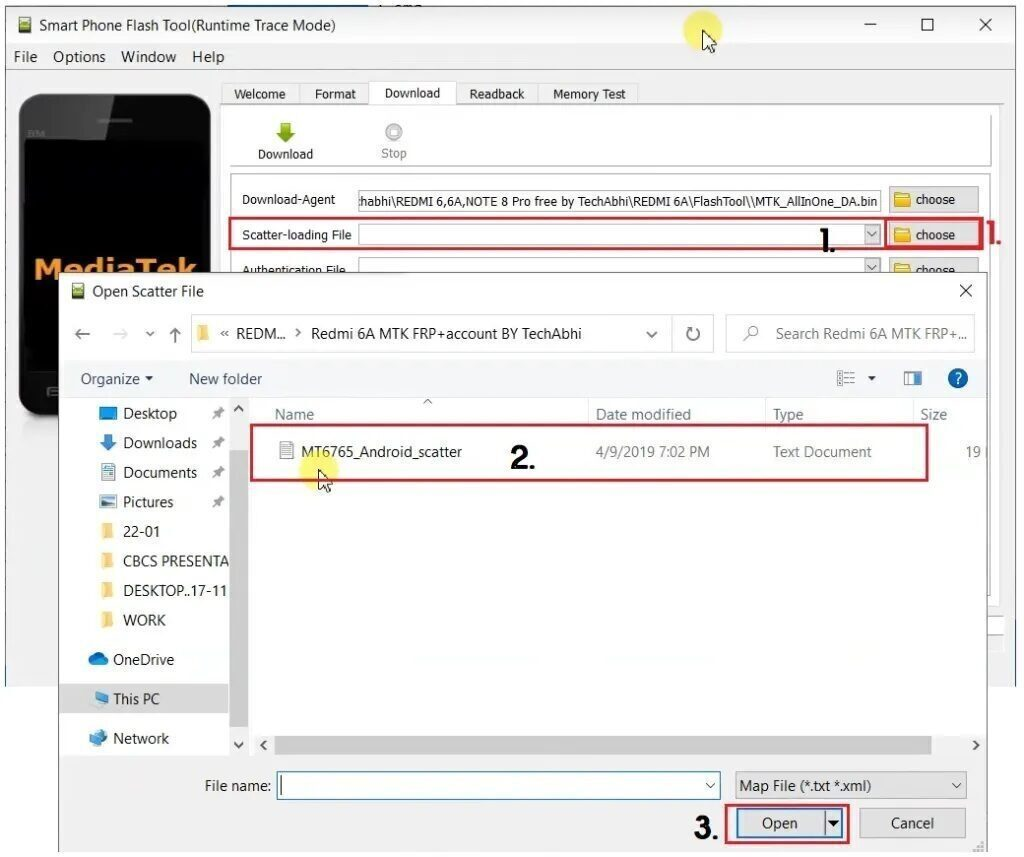
- Click on Choose from Scatter-Loading File Tab and select the MTK_Android_scatter.txt file.
- Tap Open.
- Now Untick the Preloader Partition.
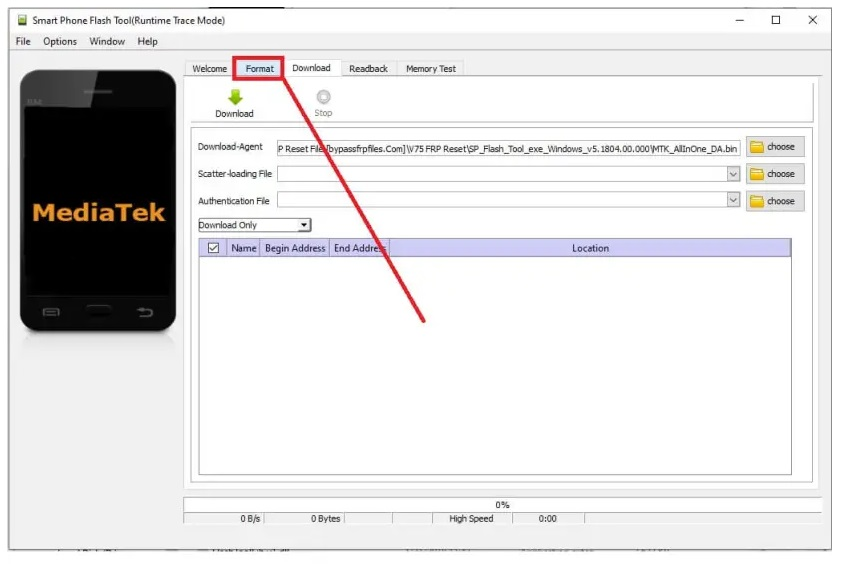
Configure the Flash tool
- Goto Format menu > Select Manual Format Flash.
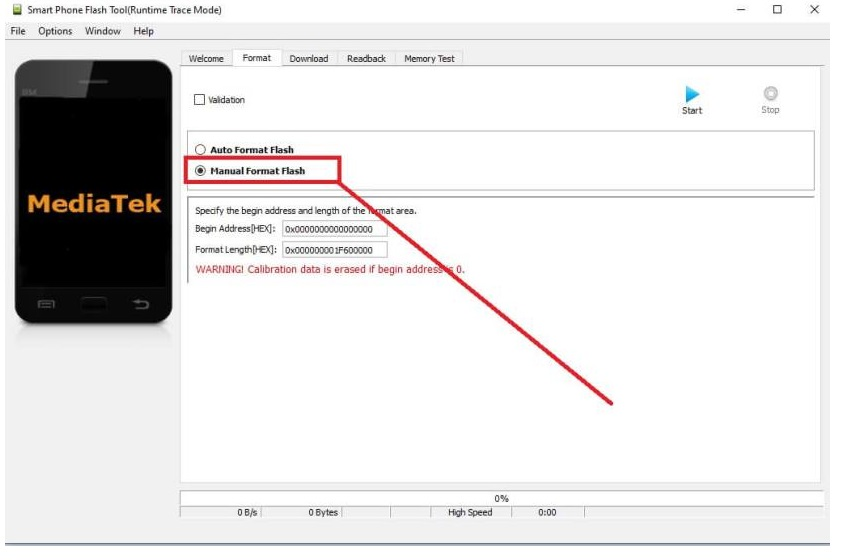
- Copy and Paste the below FRP Address into the SP flash tool
Also read: Infinix Note 5 Stylus X605 FRP File
Credit= Bypassfrpfiles.com
━━━━━━━━━━━━━
🔰 FRP Erase Address:━
Start_addr: 0x8508000
Size: 0x100000
🔰 USERDATA Erase Address:━
━━━━━━━━━━━━━━
Start_addr: 0x37f000000
Size: 0xc0000000
🔰 PERSIST Erase Address:━
━━━━━━━━━━━━━━
Start_addr: 0x13608000
Size: 0x31f8000
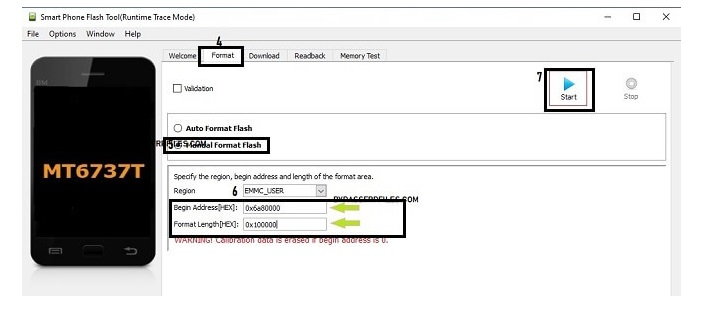
- Click START.
Connect Infinix Hot 60 Pro Plus Phone to Windows
- Power Off your Infinix Hot 60 Pro Plus phone.
- Connect your device to computer via USB cable.
- Run Auth tool & Click Disable Auth
- This will disable auth proctection.

- Open Device Manager > Check the COMPORT Number.
- Select the COMPORT number (In my case I have COM9).
Start unlocking
- The unlocking process will begin.
- It will take some time to finish.
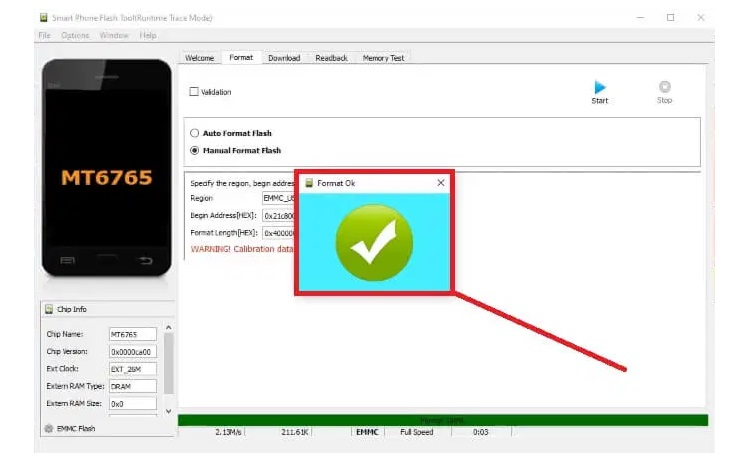
- Once finished, disconnect and Power On your Infinix Hot 60 Pro Plus.
- Setup all initial steps.
- That’s it.
Also read: Bypass Google FRP Lock on Infinix Hot 50 5G
Method 2: Infinix Hot 60 Pro Plus Reset with FRP Tool
- First, Download Infinix Hot 60 Pro Plus FRP File.
- After that, Download & install the BFT Tool by BossV
- Visit, FRP Tool page for installation instructions.
- Once you’ve done, run BFT.exe as Admin.
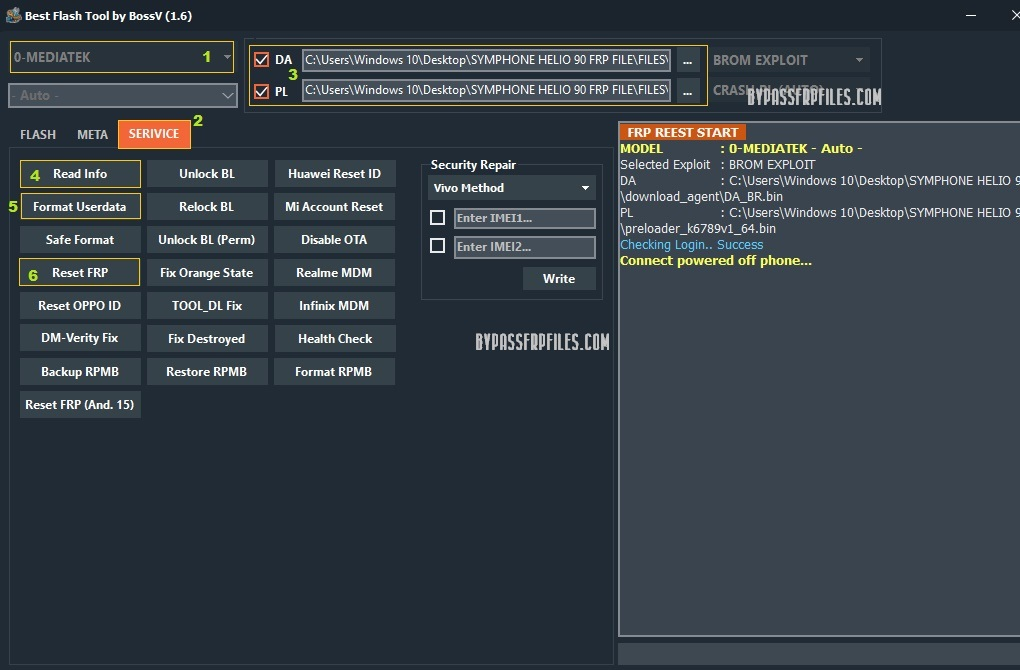
- Go to, MediaTek tab.
- Select the DA & Preloader file from FRP File.
- Then, navigate to Service tab & Click Reset FRP.
- Now, power off your Infinix Hot 60 Pro Plus & connect to Windows.
- The phone will be detected & bypass the FRP lock.
- That’s it.
More Infinix FRP Guides:
- Infinix Hot 30 5G Bypass FRP Google Lock
- Infinix Note 40 5G Bypass FRP Google Lock
- Android Utility Tool
- Infinix Note 40 Pro Plus Bypass FRP
Read Me:
This FRP Reset File solution is one of the easiest and effective way to Reset Google lock on Infinix Hot 60 Pro Plus. However, only proceed with caution and use at your own risk as it has some serious consequences.
Booting Process: After successfully performing the unlocking process, the device will take between 1 and 5 minutes to booting completely. After that, you can setup the initial process much like new phone.
USB Driver: To use the FRP remove file, you’ll need to install USB Driver on your Windows computer to fix connection related issues, head over to our MTK USB Driver page to download the latest version.
Flash Tool: In this guide, we’ve use the SP Flash Tool for unlocking or flashing firmware on your phone, Also, you can use BFT Best Flash Tool or UnlockTool, TSM Tool, etc.
Read More: Android Utility Tool
Alternative Solution: Also, you can use premium & freebie tools to unlock Infinix Hot 60 Pro Plus phone. You can head over to our,
- BFT Best Flash Tool by BossV (Free)
- UnlockTool (Paid)
- King Soft Team Tool
Also read: Bypass Google FRP Lock on Infinix GT 20 Pro