This guide will guide you on How to unlock bootloader on OnePlus Ace 3. Unlocking the Bootloader allows you to Root your phone, install Custom ROMs & Recovery, Make System changes, etc.
How to Unlock bootloader on OnePlus Ace 3
If you’re looking to unlock bootloader for explore custom development, then we’ll show you exactly how to do that. Let’s get started!

Also check: Minimal ADB And Fastboot
Pre-requisites
The following tools, files, and instructions will be needed to Unlock BL on your Nubia Red Magic 8 Pro. Please make sure to follow all these Prerequisites before flashing the phone.
More: Huawei Bootloader Unlock Tool
- Install Android SDK and Fastboot on your Windows.
- Full Charge your OnePlus Ace 3.
- Use the OEM original USB cable.
- Please take backup of your OnePlus Ace 3.
- Unlocking BL will erase all your personal data.
Also check: BMB Huawei Kirin Tool
Downloads Tools & Drivers
Download the stock firmware and Android SDK tool from below to begin the unlocking process.
Steps to Unlock Bootloader
Make sure, Unlocking bootloader can void your smartphones warranty and and can brick your phone. So, follow the process carefully.
Install Android SDK Platform Tool
- Download the tool & USB Driver.
- Next, extract both files.
- Install adb fastboot driver on Windows.

More: Xiaomi Bootloader Tool
Enable USB Debugging and OEM Unlocking
- Open Settings app > Go down to > About Device.
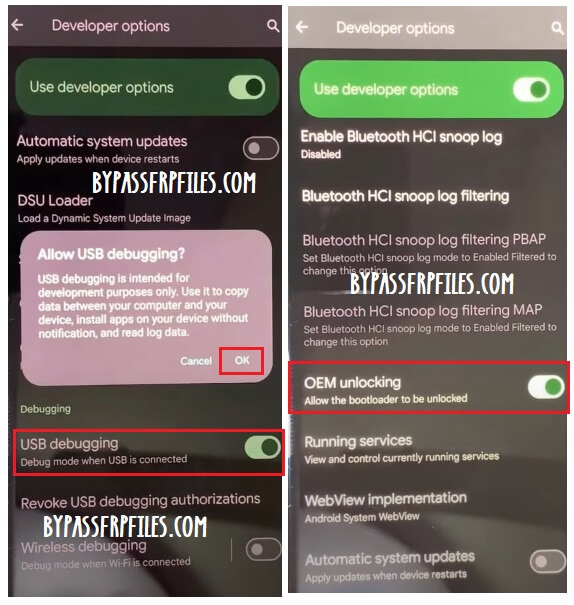
- Tap on Build Number 7 times > The Developer option will be enabled.
- Go back to Settings > System > Advanced > Developer Options >
- Enable USB Debugging and OEM Unlocking.
Read: QC Unlocker
Boot Nubia Red Magic 8 Pro to Fastboot Mode
- Power Off your OnePlus Ace 3.
- Connect your phone to Windows using USB cable.
- Press & Hold Volume Down (-) & Power Key.
- Then phone will boot into Fastboot mode.
- If not then Boot your phone into Recovery Mode & Select Reboot to Bootloader.
More: Qualcomm SDM 450 Tool
Run Android Platform Tool
- Open CMD on Platform Tool folder.
- Click on the Folder Path & Type CMD.
- Select Windows CMD.
- Type the following command to verify the connected phone.
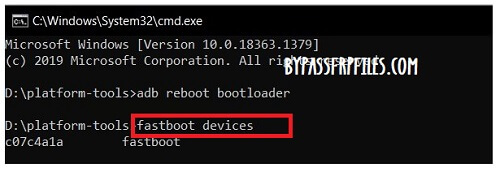
fastboot devicesRead: TFT Unlock Setup Download
- Next, Enter the following command.

fastboot flashing unlock
- Go to your OnePlus Ace 3 & confirm the BL unlock status using buttons.
- Done, you have successfully unlock Bootloader on your OnePlus Ace 3 phone.
Read more: Android CDC Driver