

FRP Bypass Apk is a simple Android app that helps you to bypass FRP Google Verification lock of any Android phones without using computer for free. Below, we provides free APK files to unlock FRP lock on Android Lollipop 5.1, to, Android 10, 11, 12, 13, 14, 15 and latest Android 16 version phones.
What is Google FRP Lock:
The FRP (Factory Reset Protection) is an inbuilt data protection feature that protects the phone from unauthorized use after resetting it to factory settings.
If you reset your phone and stuck at Google verification screen, you can use last synced Gmail account. Else, you’ve to bypass FRP lock through these software and applications.
The FRP Bypass Apk enables you to unlock Google account FRP lock and regain access on any Android FRP-enabled phone without using Windows computers.
Open apps
Quick Shortcuts helps you to open installed and System apps, Settings on your Android phone to remove FRP lock with APK files.
- Google Search App

- Set Screen Lock
- Alliance Shield App
- Samsung My Files
- Login Account
- Settings App
- QR Scan Activity
- Google Assistant
- Package Disabler Pro
- Dial *#0*#
- YouTube App
- Gmail App
- Files Shortcut
- Galaxy Store
- Activity Manager
- Enable Tecno/Infinix ADB *#85#
- Samsung Secure Folder
- Screen Smartlock
- Samsung Touch ID
- Samsung Smart Switch
- Home Launcher
- Mi File Manager
- S9 Launcher
- Chrome Browser
- Vivo EasyShare
- Xshare Mini
- Calculator App
- Motorola Launcher
- Samsung Internet
- Install Hidden Settings
- iOS Launcher


FRP Bypass Apk Download
The following apps let you easily remove FRP lock and regain access to your Android phone.
Key Features of FRP Bypass:
- Compatible with latest Android 13, 14, 15 and Android 16 versions.
- Offers multiple way includes Opening browser, access to hidden settings, enable ADB, etc.
- Regain access to Android home screen after a factory reset.
- Its designed for the users who have forgotten their last credentials and cannot access to phone.
- Works with all Android brands like Samsung, Infinix, Vivo, Oppo, Xiaomi, and Realme.
- Easy-to-follow process.
- Safe and reliable.
More: FRPFILE Bypass Apk
Steps to Disable Android Google FRP Lock
Disabling FRP (Factory Reset Protection) is recommended if you want to hard or factory reset, sell your Android device to another user. This ensures the next owner can set up the phone without issues. The follow the simple instructions:
- Firstly, Open your device Settings app.
- Go down & select Accounts.
- After that, list of added account will be shown.
- Select the Google Account from the list.
- Next, Remove.
- If you multiple Google account, remove one-by-one.
- After that, Go to Settings main menu & System.
- Select Reset options.
- Tap Factory data reset.
- Confirm by tapping the blue button.
- Enter your PIN, password, or security pattern if asked.
Once the reset is complete, the phone will be ready for setup by a new user or the FRP protection will be disabled.
Also read: vnROM to Bypass Google
Requirements:
- Android 5.1 or higher is required.
- You have to enable “Unknown Sources” option on settings > Privacy.
- Minimum battery charge should be 50% & above.
How to install & Use FRP Bypass APK:
1. Download FRP Bypass Apk latest version to your phone.
2. Then Open the File Manager using Open Files app.
3. Then find the Apk and tap on it.
4. Install & open the apk.
5. Go back to the device browser.
6. Tap on the Search bar and type any of these two below URL’s.
7. Go to the FRP Apps section.
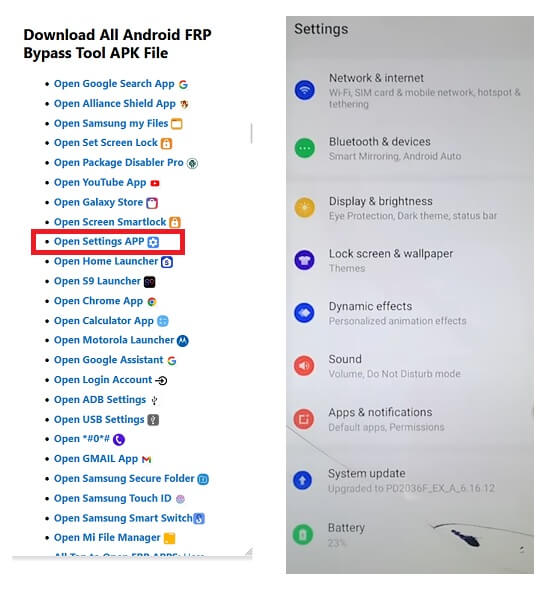
8. Select Open Settings App > Tap Open.
Install the App
9. Now it will lead you to the device Settings app.
10. Go down & select System Settings.
11. Tap on Backup & Reset > Reset Phone.
12. Now Tap on Reset System Settings Only > Confirm Reset System Settings Only > Reset. System Settings Only.
Now Bypass FRP lock
13. Then Select Erase All data > Confirm Erase Data > Erase Data.
14. Your device will be rebooted.
15. The factory reset process will begin.
16. Wait for 3-4 minutes.

17. Then the device will boot automatically.
18. Setup all initial steps on your Android phone.
19. That’s it.
20. You have successfully unlocked the FRP verification.
Read More: Download Android GAM APK All Version (6, 7, 8, 9, 10)
Questions & Answers:
FRP Lock known as Factory Reset Protection introduced with Android 5.1. It was designed to protect the phones from reusing the device after the factory reset. FRP turns On automatically when you have setup a Google Account on your phone for the first time.
Yes, it is possible to Remove FRP lock from Android phone. FRP take effect after the factory reset, if you remove the Google account before performing factory reset, you can skip the frp lock verification or use these apps and guides to unlock it.
No, FRP turns On after the factory reset, So, Factory Reset wouldn’t be able to help you to unlock the FRP (Factory Reset Protection) lock from phone.
No, bypassing FRP lock doesn’t void the device warranty unless you use some method that requires flashing firmware or unlocking the Bootloader of the phone.
Read Me (Additional Information):
In this thoroughly written guide, we have shared the download link to all the latest useful FRP Bypass Apk and tools for 2026 with complete guidance to unlocking Google Account verification from your phone without using a computer.
- Android version 5.1 to above Android version are supported.
- You have to enable unknown sources from your device settings to install it on the phone.
If interested Join us on Telegram, it’s free:
https://t.me/droidsolution
If you want one click solution or less complex method to unlock frp lock then head over to our FRP Bypass Tool for PC to bypass the FRP lock directly or by accessing Chrome Browser.


Best website to get complete details of use frp bypass apk
Glad to hear that
Nice. Thanks for sharing
Glad to hear that
Hi, how do i fix something went wrong when i press backup on my samsung A035
Follow: https://bypassfrpfiles.com/2022/06/samsung-a03-frp-google-bypass-unlock-tool/
Nice post.. thanks
This process does not work anymore. I have an s10+ from sprint and I can’t make it past add network. When you hold down browser it doesnt give language options. Must have been a patch.
Here: https://bypassfrpfiles.com/2021/08/unlock-samsung-s10-plus-sm-g975f-u-w-android-11-frp-google/
Hello my brother, in my phone samsung galaxy J5 doesnt work the 3 dots are not there when i goin to put the password 🙁
Just reset the phone, then try the Easy Samsung FRP tool or Muslim Odin Tool to reach samsung internet, then use tiny.cc/frptools and go to frp bypass apk section => tap to open device apps => open lock screen => tap Open. Now draw Pattern lock and reset and setup the phone..
Muslim Odin Tool: https://bypassfrpfiles.com/2021/02/muslim-odin-tool-all-verison/
Easy Samsung FRP Tool: https://bypassfrpfiles.com/2020/08/easy-samsung-frp-tool/
Can you use any USB for the Octoplus download or do I have to buy the specific Octoplus dongle?
The new login tool doesn’t need the box.
Great thanks, could you reply with the link for this as I cannot find it now
Learn unlock your frp bypass
This website has helped me a lot to remove the FRP lock. thanks for bypassfrpfiles.com
Says my phone is not allowed to install apps from unknown source on my a12
Please provide me the device model
when trying to open the app, i get “for your security this device is not authorized to open from this site”
??? what site? Youtube?
please share the device model?
Samsung a12
I’m thoroughly confused. How can I download and install any of these things when I can’t get past the “Verify your account” page?
We will help you please provide me your device model & Android version.
No login my Google account
Please help
Please provide the device model number and Android version.
You are the man!
Its not letting me open the frp after i installed because its from an unknown source and its not letting me change that setting on my samsung m31s android 12
use any MTP Test Mode tool to Bypass FRP: Use Android utility Tool > Samsung Tab > Enable ADB. On the phone > Emergency Call > Dial *#0*# > Test Mode will be enabled > Connect USB > Next Click Reset FRP on the tool.