
Here we demonstrate you the latest method that helps us to unlock FRP (factory reset protection) from Samsung Galaxy J4 core, so if you also facing the frp lock from your device then follow the full process step by step that’s help you to Bypass FRP Google Account Samsung Galaxy J4 Core, before we start we we talk about some specs of Samsung Galaxy J4 Core,
Samsung Galaxy J4 Core some specifications
This phone has “6.0” screeen with 720×1480 resolution, Its powered by Qualcomm snapdragon 425 with 1.4GHZ, and 1GB of RAM Memory, and this device has 16GB of internal memory (ROM) storage, This device has supports 512GB of expendable memory.
But This post is about by “Bypass FRP Google Samsung Galaxy J4 Core” very easily. But you can try this method on other Samsung J4 Core Models likes SM-J410F FRP and SM-J410G FRP, SM-J410Y FRP, SM-J410M FRP,
How To Disable FRP Protection (Factory Reset Protection) on Android devices
First of all, the FRP lock feature will automatically enable added on your device when you added a Google (Gmail) account on amsung Galaxy J4 Core. If you want to disable this feature then you need to delete the Gmail Account from device Settings. check the below process to delete Google Account from amsung Galaxy J4 Core.
How to add Google Account on amsung Galaxy J4 Core
First of all, go to settings menu=>> Accounts=>> Add an Account =>> Google
Enter your Google Account Information there.
Now How to Remove (Delete) Google Account on amsung Galaxy J4 Core
First of all, go to settings menu=>> Accounts=>> Add an Account =>> Google
Now choose the Google (Gmail) Account
Then Find the remove icon from the top right corne
Things that you needed
First of all, download the Samsung J410F Combination File, J410G Combination file
Note:- you can flash this two combination file in any Samsung Galaxy Core Models
-Then Download the Samsung J4 Flash File.
-Once downloading done, then download Odin Flash tool,
-After that, download Samsung USB driver.
-Then follow the below process carefully step by step.
Download Samsung Galaxy J4 Core Stock Firmware
-First of all, follow this step to download Stock firmware for your Samsung Galaxy J4 Core.
-We want to Download latest stock firmware so that’s why we want to share with a website “Sammobile.com”, because we need the latest version of Stock firmware to Bypass FRP Google Samsung Galaxy J4 Core-Android-8.1.
-Visit this link “Sammobile.com”=> Here
-Then, you need to sign in or sign up to download the stock firmware.
-After the sign in process is complete then choose “free account”.
-Once done, Then go to”Firmware” tab and put your device model name and then download latest stock firmware according to your device country and version.
-After that, Now follow the below process to (SM-J410F FRP | SM-J410G FRP) easily.
Put Samsung Galaxy J4 Core into Download Mode
-Now on the “Recovery Mode” select “Reboot System” by using Volume UP and Down key and then confirm to press Power key.
-Then once again power off your device.
-After that, Press (Volume Down + Volume UP +connect the USB cable) key together until you see “Warning” screen on your device,
-Then press the “Volume Up” key to confirm “Download Mode”.
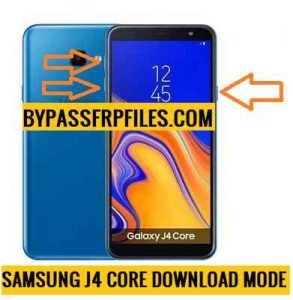
-Now connect your device to PC.
-Download the latest Samsung USB driver.
-Then install the Samsung USB Driver on your PC.
-Now Flash the latest Combination file on your device.
Now Flash Combination Firmware
-First, download the Samsung J4 Core Combination file on your PC, and also download the latest “Odin” tool.
-After that, extract the Odin tool.
-Then extract the Combination file.
-Once all the files extracted, then follow this process to Flash the combination firmware and Bypass FRP Google Account Samsung Galaxy J4 Core.
-Now open the extracted “Odin” flash tool folder.
-There you will see “Odin.exe” and run the “Odin” tool from there.
-Once Odin tool is opened.
-Then there you will see “AP/CP/CSC/BL” tab there.
-Now click on the “AP” tab and then give the file path of extracted combination file folder there.
-Check on the “Log Box” there you will see “ADDED” message.
-Also check “ID: COM” turn in blue color in the Odin tool.
-Now hit the “START” button on the Odin tool.
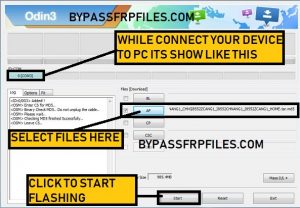
-Then a green color tab will be appearing on the Odin tool, that’s mean your device will start Flashing.
-Once flashing successfully finished. then your device automatically boot in to factory menu.
Now Run the FRP tool and Bypass FRP Samsung Galaxy J4 Core
-Once your device successfully booting to Factory Menu.
-Then Swipe down your fingers to bring “Notification Menu”.
-After that, select the “gear” icon / “Settings” icon there.
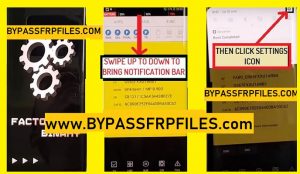
-Then you will redirect to the “Settings” menu to Bypass FRP Google Account Samsung Galaxy J4 Core,
-After that, go down and select “About Device” there.
-Then tap on the “Software Information” and tap on the “Build Number” 5-7times.
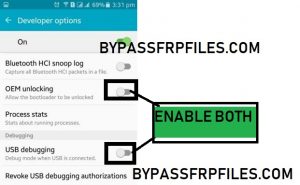
-Go back to the “Settings” menu and then go down and select there “Developer Option” menu.
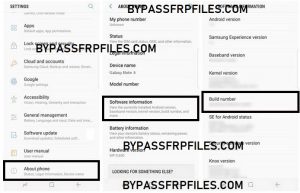
-Then go down and then enable “OEM Unlcok” and “USB Debugging” mode there.
-Once done, then connect your device to PC.
Download “ADB FRP” Tool [DOWNLOAD]
-After that, download the “ADB FRP” tool.
-Extract the “ADB FRP” tool to your computer.
-Then open the “ADB FRP” tool.
-Now a “CMD” prompt will open.
-Then press any key in “CMD” window.
-Check on your device, a popup will show tap “ok” from there.
-After that, close the “ADB FRP” tool and reopen the tool again.
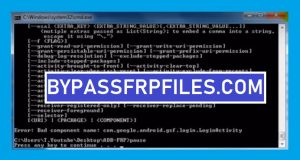
-then press any to Bypass SM-J410F FRP and SM-J410G FRP.
-Done, Now we need to flash the Stock firmware.
Now flash Stock Firmware Samsung Galaxy J4 Core
-Open the Odin tool once again.
-Now extract the Samsung J4 Core Stock Firmware.
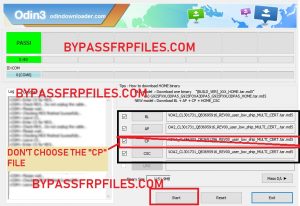
-On the Odin tool (AP,CP,CSC,BL,USERDATA) tab.
-Then choose the Stock firmware file.
-Note- You have to choose the right firmware file on the right tab. choose “AP” file in “AP” tab, “BL” file in the “BL” tab and then choose “Home_CSC” file in “CSC” tab. Choose all the files from the “Stock Firmware” folder.
Make Sure:- Do not choose the “CP” file on the Odin tool.
-Now put your device again on Download Mode to Bypass SM-J410F FRP and SM-J410G FRP successfully.
-Power off your device then press and Hold (Home+Volume Down+Power) key, until your device boot in to the “Warning” screen.
-After that, Press the Volume Up to Confirm the Download mode.
-After that, connect your device to PC.
-Then click the “Start” button on the Odin tool.
-Then flashing will be started.
-Once done, then disconnect your device and Power on your device.
-Done, you have successfully Bypass FRP Google Account Samsung Galaxy J4 Core.
Check Some Other Tutorials Here:-
Thanks for visiting us, Comment below if you face any problem With Bypass SM-J410F FRP and SM-J410G FRP, SM-J410Y FRP, SM-J410M FRP, we will try to solve your problem as soon as possible.

